DeepSeek V4 Flash takes 156 GB on disk. A single NVIDIA DGX Spark has 128 GB of unified memory, shared between CPU and GPU, so one box can’t hold it. Two Sparks connected back to back through their 200 Gb QSFP ports can, with room left for a large KV cache.
This guide walks through a working deployment on Kubernetes and then connects OpenAI’s Codex CLI to it, so a coding agent runs end to end on local hardware. It’s written for readers who already run Kubernetes with GPUs and want to serve a model too large for one node.
You’ll set up:
- A vLLM build that supports the GB10 GPU.
- A two-node tensor-parallel deployment.
- RDMA networking between the nodes.
- Codex CLI, configured for a non-OpenAI model.
Results
On this setup, DeepSeek V4 Flash delivers:
- 51 tokens/s single-stream decode with thinking disabled (about 20 tokens/s in my first version).
- 0.25 to 0.5 s time to first token on a short prompt.
- 262,144 tokens of context per request, from a KV cache that holds about 470,000 tokens.
- A clean pass of my Codex CLI validation suite: shell commands, file edits, web search through MCP, and guard rails.
Hardware and software
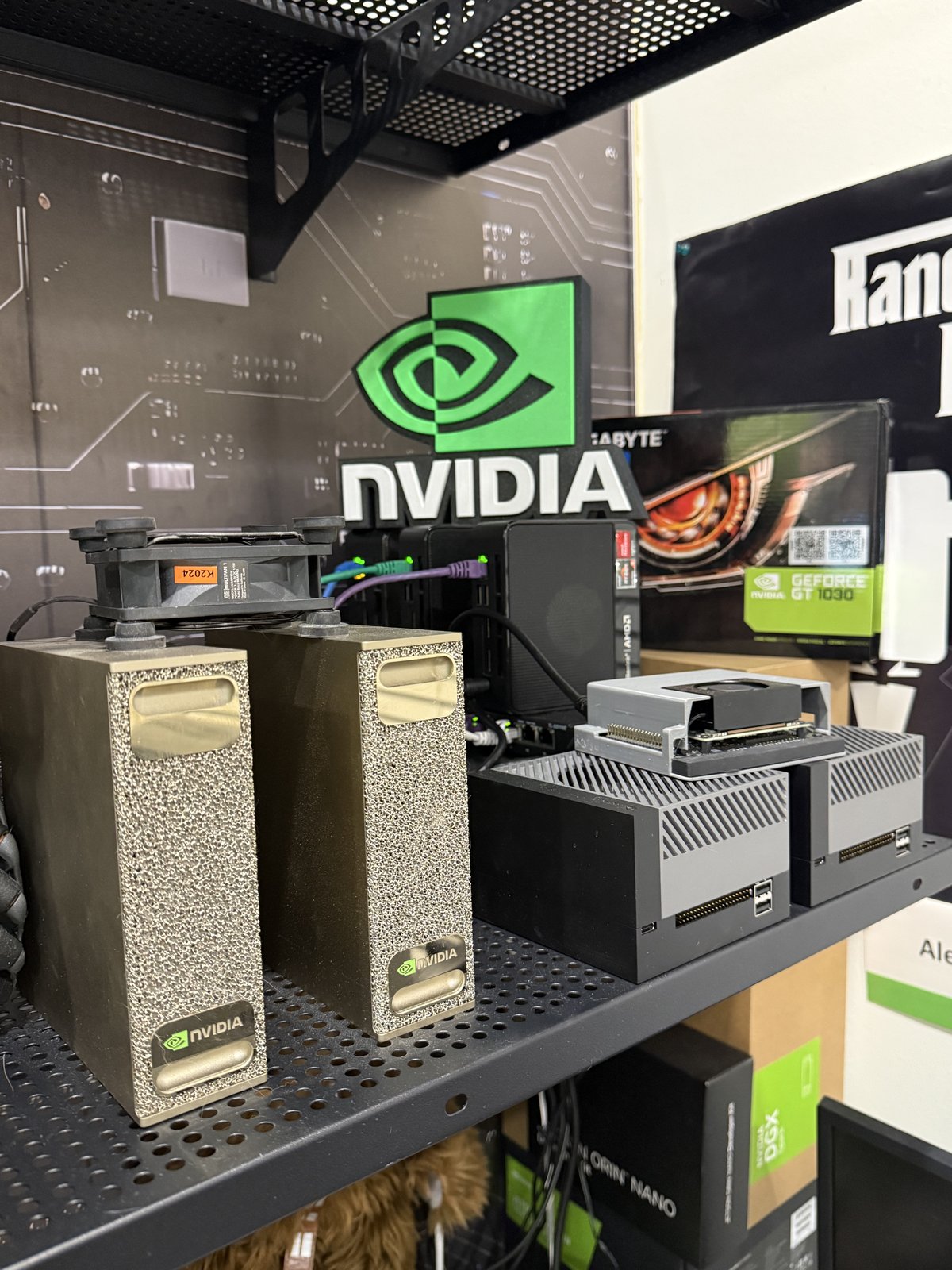
My two DGX Sparks (left) and the Jetson AGX Orins that run the control plane and supporting services (right).
- 2× NVIDIA DGX Spark: GB10 Grace Blackwell (
sm_121), arm64, 128 GB unified memory, Ubuntu 24.04. - One 1 m passive copper QSFP direct-attach cable (Amphenol NJAAKK-AU06) between the Sparks.
- 2× NVIDIA Jetson AGX Orin (64 GB) plus a small Jetson, running the RKE2 control plane and the supporting services: the LiteLLM router, monitoring and a small Qwen2.5-7B model. The Sparks run as worker nodes dedicated to DeepSeek.
- RKE2 v1.36 with the NVIDIA GPU Operator; each Spark exposes one
nvidia.com/gpu. - vLLM image
eugr/spark-vllm-b12x:nightly-20260928. - Model
deepseek-ai/DeepSeek-V4-Flash-0731. - Codex CLI 0.163 and a LiteLLM router.
Prerequisites
- A QSFP direct-attach cable between the two Sparks, port to port with no switch. I
use a 1 m passive copper cable (Amphenol NJAAKK-AU06), which links at 200 Gb/s. In
this guide the link uses interface
enp1s0f1np1with addresses192.168.100.10(spark-1) and192.168.100.11(spark-2), and carries only inter-GPU traffic. Confirm it withethtool enp1s0f1np1, which should reportSpeed: 200000Mb/sandPort: Direct Attach Copper. Step 3 raises its MTU to 9000. - Model weights downloaded to
/mnt/modelson both nodes. Each node loads its own half from local disk. - Permission to run privileged pods on the Spark nodes, which RDMA requires.
Step 1: Use a vLLM image built for GB10
Stock NGC vLLM images can’t run this model on GB10. They lack a working block-scaled FP8
matrix-multiply kernel for sm_121: DeepGEMM has no sm_12x scale-factor path, and
CUTLASS’s w8a8 kernels aren’t compiled for that architecture. Depending on the build,
loading either fails outright or hits assertions such as DeepGEMM layout.hpp: t.dim()==N.
Community image eugr/spark-vllm-b12x
solves this. It ships GB10-specific kernels, called B12X, for the MoE layers, linear
layers, attention and the MLA output projection, along with DeepSeek V4 model support.
Pin a dated nightly tag. latest changes every few days, and the environment
variables below change with it.
Step 2: Split the model across both nodes
vLLM’s native multi-node mode needs neither Ray nor SSH between nodes. Each Spark runs
its own vllm serve process:
- Head node (
--node-rank 0): serves the HTTP API and hosts the rendezvous on TCP port 29501. - Worker node (
--node-rank 1 --headless): connects to the head and serves no HTTP.
With --tensor-parallel-size 2, every layer is split across both GPUs. In Kubernetes
this becomes two Deployments, each pinned to its node with nodeName and running on
hostNetwork so collective traffic can use the direct-attach link.
Why tensor parallelism instead of expert parallelism
For a mixture-of-experts (MoE) model, expert parallelism (EP) usually scales better:
tokens travel to the GPU that holds their expert instead of synchronizing every layer.
When I tested --enable-expert-parallel on an earlier image, the B12X EP code path
crashed during memory profiling with B12X EP local expert metadata does not match prepared weights. Tensor parallelism (TP) works, at the cost of an all-reduce over the
cable for every layer. That cost makes the network the main bottleneck, which is what
step 3 addresses.
Step 3: Run NCCL over RoCE
My first deployment sent NCCL traffic over TCP sockets (NCCL_IB_DISABLE=1), and
decode topped out near 20 tokens/s. A Spark’s ConnectX port supports RDMA over
Converged Ethernet (RoCE), and NCCL uses it once a container can reach the RDMA
devices. That requires:
privileged: trueand theIPC_LOCKcapability, so NCCL can pin memory.- A hostPath mount of
/dev/infiniband. NCCL_IB_HCA=rocep1s0f1:1, which selects the RoCE device behind the cabled port.NCCL_NET_GDR_LEVEL=0, which disables GPUDirect RDMA (GDR). GB10’s unified memory doesn’t support GDR. Setting this leaves RoCE enabled; GDR and RoCE are independent settings.
RoCE wasn’t the only change between 20 and 51 tokens/s. A newer image and speculative decoding (step 4) also contributed, and I didn’t measure each one in isolation.
Enable jumbo frames on the link
RoCE derives its packet size from the interface MTU. At the default MTU of 1500,
ibv_devinfo reports active_mtu: 1024. Raising the link to 9000 lets RoCE use its
maximum of 4096. Because the cable runs port to port, only the two Sparks need the
change. Set it persistently on both nodes (the connection on my nodes is named
cx7-p1):
nmcli connection modify cx7-p1 802-3-ethernet.mtu 9000
ip link set enp1s0f1np1 mtu 9000          # apply now without bouncing the link
ping -M do -s 8972 -c 3 192.168.100.11    # from spark-1: jumbo frames pass unfragmented
ibv_devinfo -d rocep1s0f1 | grep active_mtu   # 4096 (5)
NCCL negotiates its RDMA connections at startup, so restart both vLLM pods afterwards. Each result below is the average of two clean runs (no other clients on the model):
- Single-stream decode: about 52 tokens/s at both MTUs. Small all-reduce messages are latency-bound, so packet size barely matters.
- Prefill of a 16k-token prompt: 2,180 → 2,380 tokens/s (+9%).
- Aggregate decode, 8 concurrent streams: 137 → 146 tokens/s (+7%).
Batched and prefill-heavy work moves larger tensors per all-reduce, which is where bigger packets help. Watch for other clients during a benchmark: two of my MTU 9000 runs overlapped with traffic through the router and showed a misleading drop.
Step 4: Deploy
Below is the head Deployment in full.
apiVersion: apps/v1
kind: Deployment
metadata:
  name: vllm-deepseek-v4-flash-head
  namespace: vllm
  labels: { app: vllm-deepseek-v4-flash, role: head }
spec:
  replicas: 1
  strategy: { type: Recreate }
  selector:
    matchLabels: { app: vllm-deepseek-v4-flash, role: head }
  template:
    metadata:
      labels: { app: vllm-deepseek-v4-flash, role: head }
    spec:
      nodeName: nvidia-spark-1
      hostNetwork: true
      dnsPolicy: ClusterFirstWithHostNet
      containers:
        - name: vllm
          image: docker.io/eugr/spark-vllm-b12x:nightly-20260928
          securityContext:
            privileged: true
            capabilities: { add: ["IPC_LOCK"] }
          command: ["/bin/bash", "-c"]
          args:
            - |
              export NCCL_SOCKET_IFNAME=enp1s0f1np1 GLOO_SOCKET_IFNAME=enp1s0f1np1 TP_SOCKET_IFNAME=enp1s0f1np1
              export NCCL_IB_DISABLE=0 NCCL_IB_HCA=rocep1s0f1:1 NCCL_NET_GDR_LEVEL=0
              export VLLM_HOST_IP=192.168.100.10
              exec vllm serve /mnt/models/DeepSeek-V4-Flash-0731 \
                --served-model-name deepseek-v4-flash \
                --host 0.0.0.0 --port 8000 \
                --tensor-parallel-size 2 \
                --nnodes 2 --node-rank 0 \
                --master-addr 192.168.100.10 --master-port 29501 \
                --distributed-executor-backend mp \
                --trust-remote-code \
                --kv-cache-dtype fp8 --block-size 256 \
                --max-model-len 262144 \
                --max-num-seqs 8 --max-num-batched-tokens 8192 \
                --gpu-memory-utilization 0.85 \
                --enable-prefix-caching \
                --tokenizer-mode deepseek_v4 \
                --tool-call-parser deepseek_v4 --enable-auto-tool-choice \
                --reasoning-parser deepseek_v4 \
                --reasoning-config '{"reasoning_parser":"deepseek_v4","reasoning_start_str":"","reasoning_end_str":""}' \
                --default-chat-template-kwargs.thinking=true \
                --default-chat-template-kwargs.reasoning_effort=high \
                --load-format b12x --moe-backend b12x --linear-backend b12x --attention-backend B12X \
                --max-cudagraph-capture-size 48 \
                --compilation-config '{"cudagraph_mode":"FULL_AND_PIECEWISE","custom_ops":["all"]}' \
                --speculative-config '{"method":"dspark","num_speculative_tokens":5,"draft_sample_method":"probabilistic","attention_backend":"B12X"}'
          env:
            - { name: HF_HUB_OFFLINE, value: "1" }
            - { name: CUTE_DSL_ARCH, value: "sm_121a" }
            # Route every FP8/MoE/MLA hot path to the GB10 kernels, not DeepGEMM.
            - { name: VLLM_USE_B12X_FP8_GEMM, value: "1" }
            - { name: VLLM_USE_B12X_MOE, value: "1" }
            - { name: VLLM_USE_B12X_WO_PROJECTION, value: "1" }
            - { name: VLLM_USE_B12X_MHC, value: "1" }
            - { name: VLLM_USE_B12X_SPARSE_INDEXER, value: "1" }
            - { name: B12X_MLA_SM120_UNIFIED, value: "1" }
            - { name: B12X_MOE_FORCE_A8, value: "1" }
            - { name: VLLM_MOE_SKIP_PADDING, value: "0" }
            # Compile once, cache the artifacts in /root/.cache/vllm.
            - { name: VLLM_USE_AOT_COMPILE, value: "1" }
            - { name: VLLM_USE_MEGA_AOT_ARTIFACT, value: "1" }
            - { name: VLLM_USE_BREAKABLE_CUDAGRAPH, value: "0" }
            - { name: VLLM_USE_V2_MODEL_RUNNER, value: "1" }
            - { name: VLLM_USE_FLASHINFER_SAMPLER, value: "1" }
            - { name: VLLM_MEMORY_PROFILE_INCLUDE_ATTN, value: "1" }
            # First requests after start can sit in kernel compiles for minutes.
            - { name: VLLM_EXECUTE_MODEL_TIMEOUT_SECONDS, value: "1800" }
          resources:
            limits: { nvidia.com/gpu: 1 }
          readinessProbe:
            httpGet: { path: /health, port: 8000 }
            initialDelaySeconds: 300
            periodSeconds: 15
            failureThreshold: 280   # ~75 min budget for the first cold start
          volumeMounts:
            - { name: models, mountPath: /mnt/models }
            - { name: vllm-cache, mountPath: /root/.cache/vllm }
            - { name: dshm, mountPath: /dev/shm }
            - { name: infiniband, mountPath: /dev/infiniband }
      volumes:
        - { name: models, hostPath: { path: /mnt/models, type: Directory } }
        - { name: vllm-cache, hostPath: { path: /mnt/models/.vllm-cache-dsv4, type: DirectoryOrCreate } }
        - { name: dshm, emptyDir: { medium: Memory, sizeLimit: 16Gi } }
        - { name: infiniband, hostPath: { path: /dev/infiniband, type: Directory } }
For the worker Deployment, copy the head and change four things:
Set
nodeName: nvidia-spark-2andVLLM_HOST_IP=192.168.100.11.Replace
--node-rank 0with--node-rank 1 --headless, and remove--host,--portand the tool-call and reasoning flags. Only the head’s API server uses them.Before
exec, add a wait loop so the worker doesn’t start ahead of the head:until (exec 3<>/dev/tcp/192.168.100.10/29501) 2>/dev/null; do sleep 3; doneRemove the readiness probe.
Finally, expose port 8000 with a NodePort Service whose selector matches role: head.
Clients then reach an OpenAI-compatible API (/v1/chat/completions,
/v1/responses) as well as an Anthropic-style /v1/messages endpoint.
Key settings explained
--gpu-memory-utilization 0.85: treat this as a ceiling. GB10 shares memory with the operating system, and 0.85 leaves about 13 GiB per node for Linux, the kubelet and system pods. Go higher, or schedule heavy pods on the head node, and the node starts swapping (see “Troubleshooting”).--kv-cache-dtype fp8: roughly doubles KV-cache capacity. Each GPU loads 80.8 GiB of weights, and the remaining budget holds 470,000 to 478,000 tokens (it varies slightly between restarts). That fits about 1.8 requests at the full 262k window, or many more short ones.--max-model-len 262144: this limit is a deployment choice. DeepSeek V4 Flash supports up to 1M tokens (YaRN scaling of 16× over a 65k base), but KV-cache size sets the practical limit. When a client reports “maximum context length is N”, N comes from this flag.--speculative-configwithdspark: drafts five tokens per step. vLLM’s logs report a mean acceptance length of 3.5 to 3.9 tokens, a large gain for single-stream decode on a link-bound TP=2 setup.--tool-call-parser deepseek_v4 --enable-auto-tool-choice: set these on the head only. Without them, vLLM rejects everytool_choice: "auto"request, the kind every coding agent sends, with HTTP 400.--default-chat-template-kwargs.thinking=truewithreasoning_effort=high: enables thinking by default. Clients can override it per request withchat_template_kwargs.thinking=falseor the Responses API’sreasoning.effort.
Troubleshooting
Startup takes about 15 minutes
Loading weights takes under 30 seconds, but engine initialization (memory profiling, KV
allocation, CUDA graph capture and kernel warm-up) took 813 seconds on my last restart.
Give the readiness probe a generous failureThreshold, and keep /root/.cache/vllm on
a hostPath so compiled artifacts survive pod restarts.
Head crash-loops while the worker looks healthy
After a network interruption, my worker stayed in a dead NCCL process group for 20 days. It showed zero restarts while its log filled with TCPStore “Broken pipe” errors. Meanwhile the head restarted 676 times: each attempt waited 10 minutes for rank 1, then failed with “Engine core initialization failed”.
To recover, delete the worker pod first, then the head pod. Check worker logs, not only restart counts, when the head won’t start.
Recreated pods fail with UnexpectedAdmissionError
A pod with nodeName set skips the scheduler, so a replacement pod can reach the node
before its predecessor releases the GPU. Kubelet admission rejects it, sometimes hundreds of
times within a minute. This resolves itself. Afterwards, remove the failed pods:
kubectl -n vllm delete pods -l app=vllm-deepseek-v4-flash --field-selector=status.phase=Failed
Decode suddenly drops to a few tokens per second
Besides one GPU’s share of the model, the head node runs the API server, tokenization and detokenization. In my cluster, an LLM router and monitoring agents on that same node pushed it into swapping at about 300 MB/s, and decode fell from about 36 to 4-5 tokens/s. Moving the router to an AGX Orin fixed it at once. Keep supporting services off the Sparks entirely.
When DeepSeek slows down, check memory pressure on the head node first:
cat /proc/pressure/memory   # "full" above a few percent means trouble
vmstat 1                    # si/so columns should stay at 0
Connect Codex CLI
With an OpenAI-compatible endpoint running, you can put a coding agent on top. Codex CLI 0.163 takes more configuration than most clients, because it assumes an OpenAI model unless told otherwise.
┌────────────────────────┐             ┌───────────────────────────┐
│ laptop                 │             │ agx-orin-2                │
│ codex-ds (Codex CLI)   │  Responses  │ LiteLLM router (NodePort) │
│ config.toml, catalog,  │  ────────▶  │ deepseek-v4-flash-cc      │
│ rules, guard hook, MCP │             │ Responses -> Chat bridge  │
└────────────────────────┘             └───────────────────────────┘
                                                    │
                                                    ▼  Chat Completions
                                       ┌───────────────────────────┐
                                       │ spark-1: vLLM head :8000  │
                                       │   ▲  TP=2, NCCL over RoCE │
                                       │   ▼  200 Gb direct-attach │
                                       │ spark-2: vLLM worker      │
                                       └───────────────────────────┘
Keep a separate Codex profile
Point CODEX_HOME at a separate directory so the default codex command stays
available for an OpenAI login:
alias codex-ds='CODEX_HOME=$HOME/.codex-ds codex'
Serve the Responses API
Current Codex releases speak only OpenAI’s Responses API; wire_api = "chat" is now a
configuration error. This nightly vLLM build serves /v1/responses itself, but I route
traffic through a LiteLLM router anyway. It also fronts older vLLM servers that return
404 on that endpoint, and it can translate Responses requests into Chat Completions:
- model_name: deepseek-v4-flash-cc
  litellm_params:
    model: hosted_vllm/deepseek-v4-flash
    api_base: http://<spark-1>:8000/v1
    api_key: "local-no-auth"
    use_chat_completions_api: true   # translate Responses -> Chat Completions
Codex can’t send use_chat_completions_api per request, so the setting lives in the
route. A second profile, -p native, targets the untranslated deepseek-v4-flash route
and uses vLLM’s own Responses implementation. Both pass the validation suite.
Add a provider block to ~/.codex-ds/config.toml:
model = "deepseek-v4-flash-cc"
model_provider = "spark"
model_reasoning_effort = "high"
model_reasoning_summary = "none"
model_catalog_json = "~/.codex-ds/model-catalog.json"
model_instructions_file = "~/.codex-ds/instructions.md"

[model_providers.spark]
name = "DGX Spark litellm"
base_url = "http://<any-node>:<router-nodeport>/v1"
experimental_bearer_token = "local-no-auth"
wire_api = "responses"
stream_idle_timeout_ms = 600000   # long thinking + long prefill
supports_websockets = false
Describe your model in a catalog
Codex looks up every model in a catalog. For an unknown model, it prints a
missing-metadata warning and falls back to OpenAI defaults: a 272k context, image
input, a hosted web-search tool and a “freeform” apply_patch tool. None of those work
against vLLM.
To fix this, generate a model-catalog.json. I copy Codex’s built-in gpt-5.5 entry
(from codex debug models) and override these fields:
context_window: 131072. I keep this below the server’s 262k because TP=2 prefill on very long prompts is slow.input_modalities: ["text"].apply_patch_tool_type: null. Freeformapply_patchis a Responses “custom” tool, which vLLM can’t serve. With this set to null, DeepSeek runsapply_patch <<'PATCH'through its shell tool instead. Codex still intercepts that call and records a tracked diff, but only whenapply_patchis alone in its command. Chained with&& pytest, it runs untracked, so my system prompt tells the model to keep it separate.supported_reasoning_levels:none,low,mediumandhigh, mapped to DeepSeek’s thinking modes.nonedisables thinking completely (zero reasoning tokens), but it also got basic arithmetic wrong in my tests. I keep-p fastfor lookups only.
Trim each request
A bare “hi” from an unmodified Codex install produced a 44 KB request. On a local MoE model that means wasted prefill on every turn, and a long tool list also leads to worse tool choices. I captured exact requests with a 20-line HTTP dump server and cut them to about 17 KB:
web_search = "disabled"                 # hosted tool; vLLM can't run it
[skills]
include_instructions = false            # -5.7 KB of skill listings
[features]                              # -14 KB of tool schemas
multi_agent = false
apps = false
plugins = false
memories = false
image_generation = false
browser_use = false
computer_use = false
view_image = false
tool_suggest = false
skill_search = false
model_instructions_file replaces Codex’s 17 KB generic prompt with a 6 KB one of my
own. For web access, client-side MCP servers (uvx mcp-server-fetch and
uvx duckduckgo-mcp-server) replace hosted search. Give each MCP server
default_tools_approval_mode = "approve"; otherwise every call fails under codex exec.
Add guard rails, and know their gaps
An agent with shell access in a lab full of real hardware needs limits. My profile uses
sandbox_mode = "workspace-write" with network access on and
approval_policy = "on-request", plus two more layers:
- Execpolicy rules (
rules/default.ruleswithprefix_rule(... "forbidden")). Always active, but they match command prefixes only. Codex splits azsh -lcscript into individual commands only when it contains plain words joined by&&,||,;or|. A redirect or$?turns the whole script into one opaque command. During validation,rm junk.txt && ls 2>&1deleted the file despite a rule forbiddingrm. - A PreToolUse hook written in Python. It scans the entire command string,
including
ssh host "sudo …", and denies destructive or hardware commands. Two caveats apply. Codex ignores a hook until you trust it in/hooks, and every edit requires trusting it again. And a hook can only allow or deny: Codex parses"ask"but ignores it, so the command runs anyway.
Validate side effects, not answers
My validation suite runs codex-ds exec headless and checks real side effects, never
the model’s own report. (Redirect stdin from /dev/null, or codex exec waits for
input.) Each case passes only if:
- the test suite passes after an
apply_patchfix; junk.txtstill exists after a forbiddenrm;- a guarded command never ran;
- a comment to a nonexistent decoy GitHub repository never posted. Even if a guard fails, the 404 means nothing gets published.
DeepSeek V4 Flash passes every case on the default, native and fast profiles, taking 3 to 32 seconds per case. Qwen2.5-7B, which runs on one of the Orins and which I tried as a faster tier, failed every multi-step case with malformed tool-call JSON. Small models make poor agents.
Conclusion
For coding and operations work, this setup earns its place. A large MoE model at 51 tokens/s, with a 262k context and working tool calls, runs on two small boxes with no API bill and no data leaving my lab.
Expect some trade-offs: a third-party image you must pin, a 15-minute cold start, a head node that must stay lightly loaded, and an agent CLI that assumes OpenAI until you configure it otherwise.
Next, I plan to try expert parallelism again on a newer image, and to lower
--gpu-memory-utilization to 0.82 for more headroom on the head node.