TL;DR
- I built a second ONTAP 9.16.1 simulator as a SnapMirror destination for my first one. Its license file already contains a full set of codes for a second serial number, so nothing extra was needed: change the serial and system ID at the boot loader, apply the second set of codes, and SnapMirror (including synchronous SnapMirror) is licensed.
- Cluster peering and SVM peering took a few minutes. One trap: the peering passphrase prompt does not accept piped input over SSH, so I used the ONTAP REST API for that step.
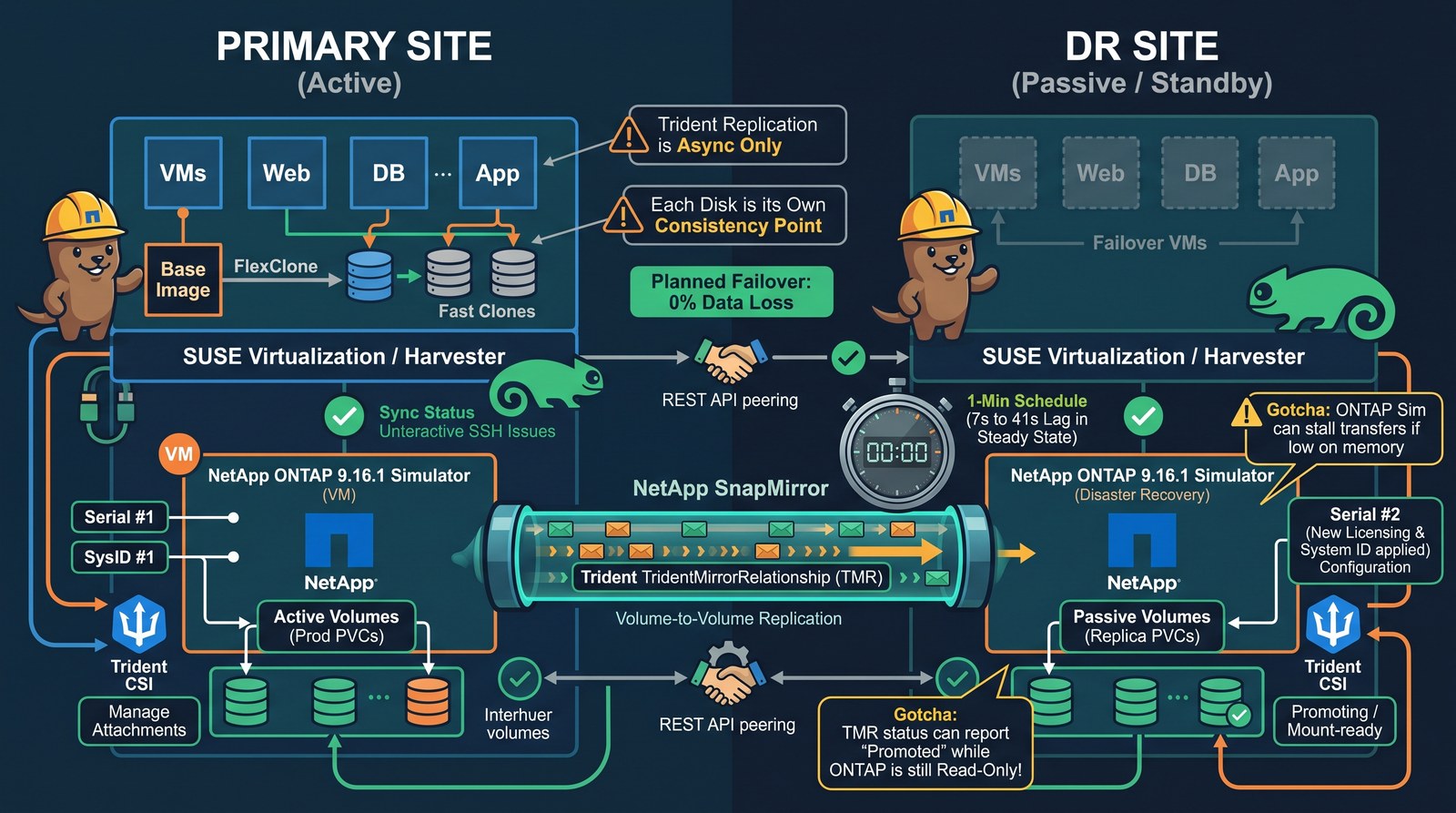
- Each VM disk on the primary SUSE Virtualization cluster is replicated with a Trident
TridentMirrorRelationship(TMR) to a PVC on the DR cluster. Disks of VMs created from images are FlexClones of the image volume; SnapMirror sends them as full, independent copies, and that works. - With a one-minute SnapMirror schedule the DR copy ran 7 to 41 seconds behind in steady state (51 samples). A planned failover with a final update lost no data.
- Gotchas: Trident replication is asynchronous only, each disk is its own consistency point, the simulator stalls transfers when it runs low on memory, and Trident 26.06 can report a mirror as promoted while ONTAP still has the volume read-only.
I wanted VM disaster recovery between two SUSE Virtualization (Harvester) clusters with the storage array doing the heavy lifting: replicate the disks with SnapMirror, keep a stopped copy of each VM on the DR side, and fail over in a couple of minutes. Both clusters already used NetApp Trident against an ONTAP simulator (see NetApp Trident on SUSE Virtualization: just the YAMLs). This post covers the storage half: a second simulator, peering, replication through Trident, and what I measured. Orchestration, done by a small CLI called Harvey that moves the VM definitions and runs failover and failback, is covered in the companion post: VM failover and failback with Harvey and NetApp SnapMirror.
I am also sharing this with NetApp engineers; corrections will be folded in.
Setup
| Item | Primary site | DR site |
|---|---|---|
| SUSE Virtualization | 1.9.0, 3 nodes | 1.10.0-rc1, 3 nodes |
| Trident | 26.06.1 | 26.06.1 |
| ONTAP | Simulator 9.16.1P1, single node | Simulator 9.16.1P1, single node |
| SVM | svm0 | svm_dr |
| Data aggregate | 19 disks, RAID-DP, 134.5 GB | 19 disks, RAID-DP, 134.5 GB |
Both simulators run on one small ESXi host (Xeon E5-1620 v2, 4 threads, 64 GB), 2 vCPU and 6 GB of RAM each. Each simulator has 23 virtual disks of 9 GB (207 GB), close to the simulator’s limit of 220 GB of raw disk per node.
Why active/passive
ONTAP offers an active/active option, SnapMirror active sync, and the policies (AutomatedFailOver, AutomatedFailOverDuplex) are present on the simulator. It does not fit this design:
- It needs ONTAP Mediator in a third failure domain for automatic failover.
- NetApp lists it for AFF and ASA systems; the simulator behaves like a FAS system.
- It is built for one set of hosts that sees both copies of a LUN (VMware vMSC, Hyper-V stretch clusters). Two separate Kubernetes clusters, each with its own Trident, do not share hosts.
Every Kubernetes-level NetApp option I found is active/passive and asynchronous: Trident volume replication (TMR), Trident Protect (AppMirrorRelationship) and SVM disaster recovery. The Trident replication documentation states it directly: “Only SnapMirror asynchronous protection is supported.”
Step 1: Build the second simulator with the second serial number
A fresh simulator OVA always boots as serial number 4082368-50-7. Two clusters with the same serial and system ID are asking for trouble, and the license codes are bound to the serial. The Simulate ONTAP installation guide describes how to boot a second node with a different identity; the same works for a second single-node cluster. Stop at the VLOADER> prompt on the first boot (press the space bar during the countdown) and set:
VLOADER> setenv SYS_SERIAL_NUM 4034389-06-2
VLOADER> setenv bootarg.nvram.sysid 4034389062
VLOADER> setenv bootarg.vm.sim.vdevinit "36:14:0,36:9:1"
VLOADER> setenv bootarg.sim.vdevinit "36:14:0,36:9:1"
VLOADER> boot
Those last two lines give the simulator 23 disks of 9 GB instead of the default small ones; I used the same layout on both simulators. Serial number and system ID survive reboots.
After cluster setup on the console, I applied the second set of codes from the simulator license file (section “Licenses for the second node in a cluster”): 11 packages, including NFS, iSCSI, FlexClone, SnapMirror and NVMe_oF.
In that file, the SnapMirror code is described as “SnapMirror, including synchronous SnapMirror”. No separate replication license was needed.
Step 2: Create a uniquely named SVM
Trident requires unique SVM names on the two sides of a replication relationship, so the DR SVM is svm_dr, not a second svm0. It gets the same protocols and LIF types as the primary:
vserver create -vserver svm_dr -rootvolume svm_dr_root -aggregate <data-aggr> -rootvolume-security-style unix
vserver add-protocols -vserver svm_dr -protocols nfs,iscsi,nvme
vserver nfs create -vserver svm_dr -v3 enabled -v4.0 enabled -v4.1 enabled
vserver iscsi create -vserver svm_dr -status-admin up
vserver nvme create -vserver svm_dr -status-admin up
network interface create -vserver svm_dr -lif lif_svm_dr_nfs   -service-policy default-data-files    -home-port e0b -address 192.0.2.28 -netmask 255.255.255.0
network interface create -vserver svm_dr -lif lif_svm_dr_iscsi -service-policy default-data-blocks   -home-port e0b -address 192.0.2.29 -netmask 255.255.255.0
network interface create -vserver svm_dr -lif lif_svm_dr_nvme  -service-policy default-data-nvme-tcp -home-port e0d -address 192.0.2.30 -netmask 255.255.255.0
network interface create -vserver svm_dr -lif lif_svm_dr_mgmt  -service-policy default-management    -home-port e0a -address 192.0.2.31 -netmask 255.255.255.0
Trident on the DR cluster authenticates with an SVM-scoped vsadmin login through the SVM management LIF, the same pattern as on the primary. I also replaced the self-signed certificates (they expire after a year) with ten-year ones on both the cluster and the SVM.
Step 3: Peer the clusters and the SVMs
Replication needs one intercluster LIF per node on each cluster:
ontap-a::> network interface create -vserver ontap-a -lif ontap-a-01_ic1 -service-policy default-intercluster -home-port e0a -address 192.0.2.45 -netmask 255.255.255.0
ontap-b::> network interface create -vserver ontap-b -lif ontap-b-01_ic1 -service-policy default-intercluster -home-port e0a -address 192.0.2.33 -netmask 255.255.255.0
ontap-a::> network ping -lif ontap-a-01_ic1 -vserver ontap-a -destination 192.0.2.33
192.0.2.33 is alive
cluster peer create asks for the passphrase on a masked prompt that reads from the terminal, so scripted SSH input is silently dropped. The REST API takes it as a field. Generate it on the first cluster:
POST https://<ontap-a>/api/cluster/peers?return_records=true
{"name": "ontap-b", "remote": {"ip_addresses": ["192.0.2.33"]},
 "authentication": {"generate_passphrase": true, "expiry_time": "PT1H"}}
and hand the returned passphrase to the second:
POST https://<ontap-b>/api/cluster/peers
{"name": "ontap-a", "remote": {"ip_addresses": ["192.0.2.45"]},
 "authentication": {"passphrase": "<from the first response>"}}
ontap-a::> cluster peer show
Peer Cluster Name         Cluster Serial Number Availability   Authentication
------------------------- --------------------- -------------- --------------
ontap-b                   1-80-000008           Available      ok
Then peer the SVMs for SnapMirror only. A request shows up as pending on the remote side about 30 seconds later and has to be accepted there:
ontap-a::> vserver peer create -vserver svm0 -peer-vserver svm_dr -applications snapmirror -peer-cluster ontap-b
ontap-b::> vserver peer accept -vserver svm_dr -peer-vserver svm0
ontap-b::> vserver peer show -fields peer-state,applications
vserver peer-vserver peer-state applications
------- ------------ ---------- ------------
svm_dr  svm0         peered     snapmirror
Step 4: Smoke test SnapMirror by hand
Before involving Kubernetes, a throwaway volume confirmed every operation a failover needs, run on the destination cluster:
volume create -vserver svm_dr -volume smtest_dst -aggregate <data-aggr> -size 200m -type DP
snapmirror create -source-path svm0:smtest -destination-path svm_dr:smtest_dst -policy MirrorAllSnapshots -schedule 5min
snapmirror initialize -destination-path svm_dr:smtest_dst    # baseline
snapmirror update     -destination-path svm_dr:smtest_dst    # incremental
snapmirror quiesce    -destination-path svm_dr:smtest_dst
snapmirror break      -destination-path svm_dr:smtest_dst    # failover: the DP volume becomes RW
snapmirror resync     -destination-path svm_dr:smtest_dst    # re-protect
Repeating it with -policy Sync reached Snapmirrored, status InSync, on the simulators. Synchronous replication works between the two clusters; Trident just cannot drive it.
One cleanup lesson: release the relationship on the source (snapmirror release) before deleting the destination volume. Otherwise the source keeps a stale destination entry and refuses to delete the volume; snapmirror release -relationship-info-only true clears it, and only while the volume is online.
Step 5: Replicate VM disks with Trident
A TridentMirrorRelationship (TMR) represents one end of a SnapMirror relationship between two PVCs. On the primary cluster, a TMR in state promoted for an existing PVC returns the ONTAP volume handle:
apiVersion: trident.netapp.io/v1
kind: TridentMirrorRelationship
metadata: {name: dr-demo-1-root, namespace: harvey-dr-demo}
spec:
  state: promoted
  volumeMappings:
  - localPVCName: dr-demo-1-root
# status.conditions[0].localVolumeHandle: svm0:rs_pvc_83b5a8b8_777a_49d5_a752_55d4f915a69e
On the DR cluster, a TMR in state established points at that handle, and a PVC annotated with the TMR name becomes the SnapMirror destination. Trident places it on the SVM that is peered with the source:
apiVersion: trident.netapp.io/v1
kind: TridentMirrorRelationship
metadata: {name: dr-demo-1-root, namespace: harvey-dr-demo}
spec:
  state: established
  replicationPolicy: MirrorAllSnapshots
  replicationSchedule: harvey-1min
  volumeMappings:
  - localPVCName: dr-demo-1-root
    remoteVolumeHandle: "svm0:rs_pvc_83b5a8b8_777a_49d5_a752_55d4f915a69e"
---
apiVersion: v1
kind: PersistentVolumeClaim
metadata:
  name: dr-demo-1-root
  namespace: harvey-dr-demo
  annotations: {trident.netapp.io/mirrorRelationship: dr-demo-1-root}
spec:
  accessModes: [ReadWriteMany]
  volumeMode: Block
  resources: {requests: {storage: 5Gi}}
  storageClassName: netapp-iscsi
harvey-1min is an ONTAP cron schedule that fires every minute, created on both simulators because a failback reverses the direction:
job schedule cron create -name harvey-1min -minute 0,1,2,3,...,59
NetApp’s documentation adds trident.netapp.io/replication: "true" to the StorageClasses. In this lab the existing StorageClasses without that parameter worked on both sides, for iSCSI and NFS.
Failover sets the DR TMR to promoted (SnapMirror break, the volume becomes read-write). Reprotect sets the old source’s TMR to reestablished with the new source handle, which reverse-resyncs and overwrites the old copy. Trident accepted adding replicationPolicy and replicationSchedule at that point to a TMR that was created without them.
VM disks cloned from images
On SUSE Virtualization, a VM created from an image on a Trident StorageClass gets a root disk that is a FlexClone of the image volume:
ontap-a::> volume clone show -vserver svm0
Vserver FlexClone                                   Parent Volume                               Parent Snapshot
------- ------------------------------------------- ------------------------------------------- --------------------
svm0    rs_pvc_83b5a8b8_777a_49d5_a752_55d4f915a69e rs_pvc_b6e17bf2_8fe9_466d_9def_11dd295b221f snapshot-3de7215c-...
I expected trouble here. There was none: SnapMirror transferred the clone as a full, independent 731 MB copy, starting from the image’s base snapshot, and the DR side needs no copy of the image.
How far behind the replica runs
Lag is the age of the newest snapshot that reached the destination, so it is also the most data an unplanned failover can lose. I sampled snapmirror show -fields lag-time every 30 seconds on the destination while a test VM wrote to its three disks (an image-cloned root disk on iSCSI, an iSCSI data disk and an NFS data disk):
| Schedule | Samples | Min | Median | Mean | Max |
|---|---|---|---|---|---|
Every minute (harvey-1min) | 51 over ~9 min | 7 s | 36 s | 24 s | 41 s |
Scheduled transfers for this light workload took a few seconds each (for example, 4.09 MB in 8 s). With a one-minute schedule the worst case is roughly one minute plus the transfer time; with the built-in 5min schedule, expect up to five minutes plus transfer time. A planned failover stops the VM first and then runs one more update per disk, which took 6 to 15 seconds per volume here, so nothing is lost.
Gotchas
Trident marks a mirror promoted while ONTAP still has it read-only. With Trident 26.06.1 and ONTAP 9.16.1, I saw a destination TMR reach status promoted while the volume was still a DP (read-only) volume. The VM then failed to start with AttachVolume.Attach failed ... volume is not read-write. It happened in two situations:
- A scheduled transfer was running when the promote arrived. Trident logged
Snapmirror break failed: snapmirror transfer already in progress, requeued, and still reportedpromoted. - A relationship that was already quiesced (paused) before the promote. Trident set
promotedwithout breaking it.
Harvey’s workaround: abort a running transfer before promoting, then check the volume type through the ONTAP REST API (GET /api/storage/volumes?fields=type) and, if it is still dp, quiesce and break the relationship directly (PATCH /api/snapmirror/relationships/{uuid} with state: paused, then broken_off). With a one-minute schedule a transfer is running a good part of the time, so this matters.
Each disk is its own consistency point. Every PVC is a separate relationship on its own schedule. In an unplanned failover test, the data disks of one VM came back from 03:56:57 and the root disk from 03:56:02. A planned failover is not affected because the VM is stopped before the final update. ONTAP consistency groups would solve this, but Trident TMRs do not use them.
Simulator memory. With 6 GB of RAM the primary simulator served three Kubernetes clusters and logged wafl.memory.statusVeryLowMemory: WAFL is running very low on memory, with 27MB remaining. Transfers then stopped making progress without failing. snapmirror abort followed by a new update or snapmirror initialize resumed them from their checkpoint. Harvey now aborts and retries a transfer that makes no progress for two minutes. A production array would not behave like this, but a lab simulator does.
Scheduled-update noise. While a relationship is quiesced, broken or still initializing, every scheduled update fails and logs smc.snapmir.update.fail. With a one-minute schedule that adds up quickly in the event log; it is expected.
Takeaways
- Two ONTAP simulators are enough to build and test SnapMirror-based VM disaster recovery end to end, licensing included.
- Trident TMRs give you mirrored PVCs on the DR cluster that behave like any other PVC after promotion. The VM definitions, Secrets and networks still have to get there some other way; that is what Harvey does.
- With a one-minute schedule the DR copy stays well under a minute behind for a light workload, and planned failovers are lossless.
- Verify promotions in ONTAP rather than trusting the TMR status alone.
Open questions for NetApp
- Is the promote behavior above known, and is there a recommended way to promote while a scheduled transfer may be running?
- Is a one-minute schedule reasonable for asynchronous SnapMirror on real arrays, or is five minutes the practical floor?
- Is there a path to consistency groups or synchronous SnapMirror for Trident-managed volumes?