Reachy Mini is a small open-source desktop robot from Pollen Robotics and Hugging Face: a head with a camera, microphones, a speaker, antennas, and a neck that can look around. Mine took more than three months to arrive after I ordered it, so I had plenty of time to plan what to do with it.
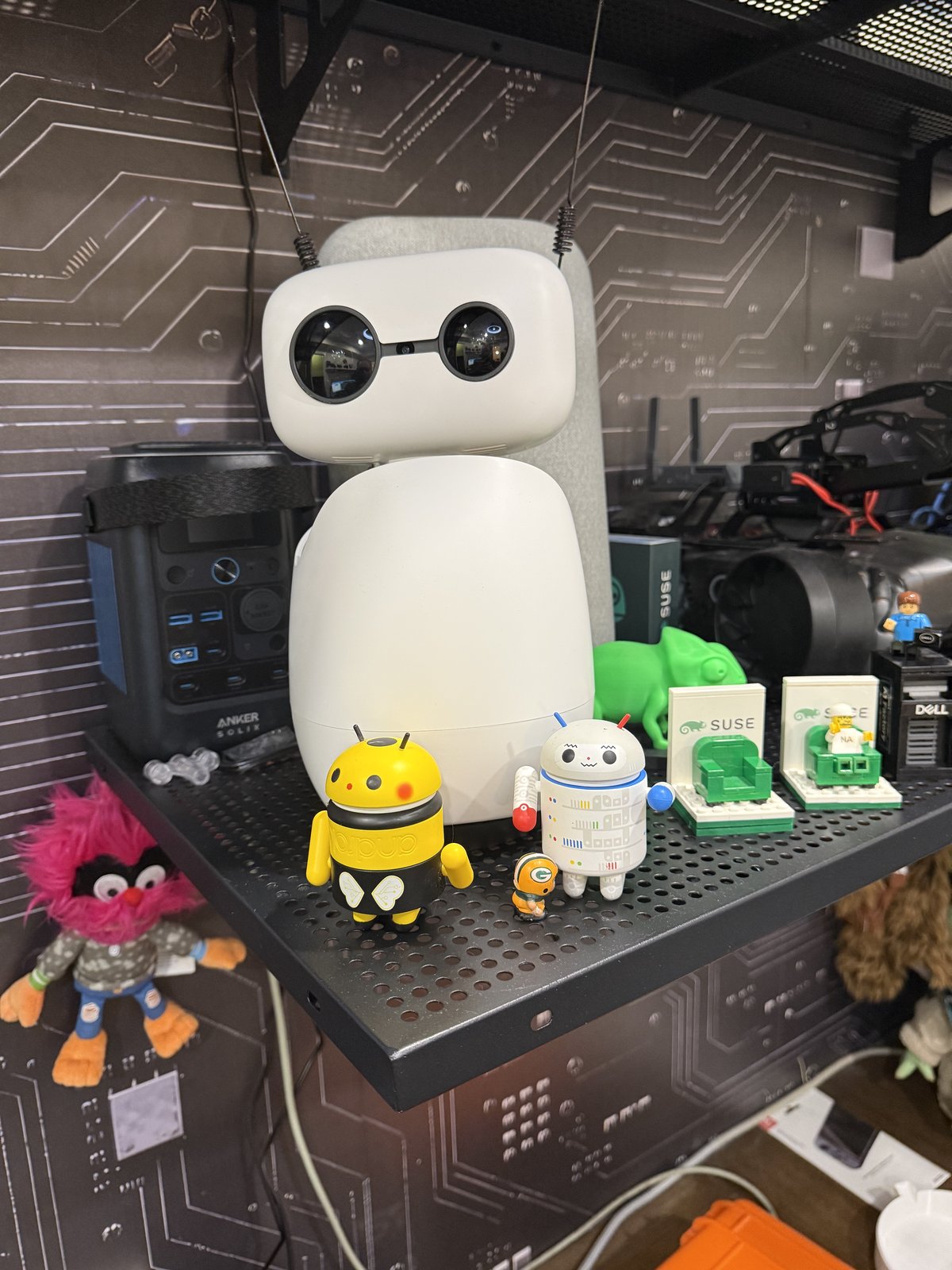
Its conversation app normally talks to a cloud realtime API. I wanted everything to run in my lab instead, on the same cluster that hosts my DGX Sparks and Jetson Orins.
This post covers three pieces of that project: how Reachy sees with a vision language model (VLM), how she recognizes people, and the SwiftBar menu-bar remote I use to drive her. All the code, patches and runbooks are open source in abonillabeeche/reachy-mini-selfhosted-realtime.
The stack
 Reachy Mini (Wi-Fi)                         Kubernetes cluster (Jetson Orins + DGX Sparks)
 ┌──────────────────────┐   realtime WS    ┌──────────────────────────────────────┐
 │ conversation app     │◀───────────────▶ │ speech-to-speech pod                  │
 │  mic / speaker / cam │                  │  Parakeet TDT (STT) + Smart Turn      │
 │  custom tools        │                  │  → Qwen2.5-7B chat model (vLLM)       │
 │  face service        │                  │  → Kokoro (TTS)                       │
 └──────────┬───────────┘                  └──────────────────────────────────────┘
            │ camera frame + question       ┌──────────────────────────────────────┐
            └─────────────────────────────▶ │ Qwen2.5-VL-7B (vLLM), vision only     │
            │ face embeddings (mirror)      └──────────────────────────────────────┘
            └─────────────────────────────▶   Qdrant: face_embeddings collection
- Hearing: NVIDIA’s Parakeet TDT transcribes speech, and a Smart Turn model decides when you’ve finished talking.
- Thinking: a Qwen2.5-7B chat model on vLLM handles the conversation and tool calls.
- Speaking: Kokoro generates the voice.
- Seeing: a separate Qwen2.5-VL-7B model describes camera frames.
- Recognizing: a face service on the robot itself, with a copy of its database in Qdrant on the cluster.
Seeing: a VLM on the side
I kept the chat model and the vision model deliberately separate. Good tool-calling chat models often can’t take images, and the serving stack I first used rejected the vision model outright whenever a request included a tool schema. So the chat model never sees an image, and the VLM never sees a tool schema.
Instead, a custom camera_vlm tool bridges them:
- When asked something visual, the chat model calls
camera_vlmwith the question. - Reachy tilts her head toward the subject, waits for it to settle, plays a shutter click, and grabs a frame.
- Next, the tool sends the frame and the question to the VLM.
- The VLM’s description goes back to the chat model, which answers in Reachy’s own voice.
Making a small model actually use the camera
A 7B chat model doesn’t reliably decide to call the tool. Asked “what am I wearing?”,
it often guessed from the conversation instead of looking. So I added a vision
router in the realtime client: when a transcript matches visual intent (“what do you
see”, “what am I wearing”, “how many…”), the router forces the camera_vlm call and
feeds the result back for a grounded reply.
The VLM generates about 10 tokens per second on its Orin, so a rich description takes 10–16 seconds. Rather than shorten the answers, I covered the wait: a short spoken cue and the shutter sound tell you she’s looking, and the head holds still at capture so the frame isn’t blurred.
Recognizing people: embeddings, not the VLM
A VLM can describe a person (“a man with glasses and a gray hoodie”), but it can’t reliably tell who that is. Identity is a different problem, so face recognition uses classic computer vision and no language model at all in the matching path:
- Detect: OpenCV’s YuNet finds faces in the frame.
- Embed: SFace turns each face into a 128-number vector.
- Match: cosine similarity against enrolled faces, with a threshold of 0.40.
It runs as a small service on the robot. Two details made it reliable:
- Vote across frames. Each “who is this?” grabs 8 fresh full-resolution frames and votes, instead of trusting one compressed snapshot. My earlier single-frame version often measured a face too small and rejected it.
- Ignore small faces. A face narrower than 110 pixels counts as no match, which keeps people in the background from being identified by mistake.
Enrollment is guided: Reachy talks you through three poses, with a countdown for
each, and stores an embedding from every pose. Its database lives on the
robot; each enrollment is also mirrored to a Qdrant face_embeddings collection on the
cluster, which makes it easy to inspect and demo.
Three bugs worth sharing
- Reachy heard herself. During enrollment she spoke prompts and a countdown while the microphone was live, so speech-to-text transcribed her own words, and the vision router took them as a request to describe a picture. My fix mutes the microphone for the whole guided capture and restores it afterwards.
- The model narrated instead of acting. Asked “enroll me, I’m Alberto”, the 7B model described taking pictures instead of calling the enrollment tool, so nothing was saved. An enroll router, like the vision router, now forces the tool call and extracts the name.
- The timeout was shorter than the job. Guided capture takes about 60–65 seconds, and the tool gave up at 60. Enrollment had in fact saved the face, but the model announced a failure over the service’s final prompt. Rule I learned: every client timeout must exceed the real capture time.
A calm head takes better pictures
Recognition and vision both depend on sharp frames, and the stock head motion works against that:
- Talking sway: by default the head wobbles while she speaks. I cut the amplitude from 1.5 to 0.3 (“nearly still”), and made it adjustable live without a restart.
- Face following: the head eased toward faces too aggressively. Lowering the tracking easing factor from 0.15 to 0.06 makes it glide instead of snap.
One warning if you modify a Reachy Mini this way: firmware and SDK updates replace
the SDK files, which wipes these patches. My install.sh re-applies everything after
an update. The SDK 1.11 update also introduced a fixed 15° head-pitch trim that sent the
head slamming down while following a face; the installer now resets it to zero.
The SwiftBar remote
SwiftBar turns any script into a macOS menu-bar menu. My Reachy plugin refreshes every 10 seconds and talks to the robot’s REST API, falling back to SSH for things the API doesn’t expose.
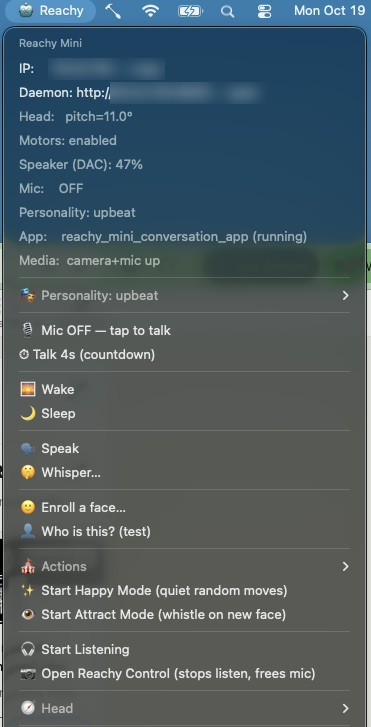
What’s in the menu, from the top:
- Status: head pitch, motors, speaker volume, microphone, active personality, the running app, and whether the camera and microphone are available.
- Personality: switch Reachy’s conversation profile.
- Talk: a microphone toggle, plus a “Talk 4s” button that opens a 4-second push-to-talk countdown on screen (via Hammerspoon).
- Wake and Sleep.
- Speak and Whisper: type something for Reachy to say.
- Faces: “Enroll a face…” and “Who is this?”, which run the same face service as the voice commands.
- Actions: dances, songs and random emotions from Pollen’s motion libraries.
- Modes: Happy Mode (quiet random moves) and Attract Mode (a whistle when a new face appears).
- Listening and Reachy Control: stream the robot’s microphone to the Mac, or open Pollen’s own control app.
- 🧭 Head: face following on or off, and talking-sway presets from Still to Vendor.
Every menu item calls the same reachy command-line tool, so anything in the menu also
works from a terminal: reachy wake, reachy identify, reachy follow toggle,
reachy sway 0.3.
Lessons
- Split models by job. A tool-calling chat model plus a separate VLM beats one model that compromises on both.
- Route intents deterministically when the model is small. Regular expressions in front of a 7B model made vision and enrollment reliable.
- Use embeddings for identity. They’re fast, deterministic and private; a VLM is the wrong tool for recognizing a specific person.
- Design for the robot’s body. Still heads take sharper photos, and a robot that hears its own voice needs its microphone gated.
- Give yourself a remote. A menu-bar menu turned dozens of SSH and REST commands into one click each, which made testing far faster.