TL;DR
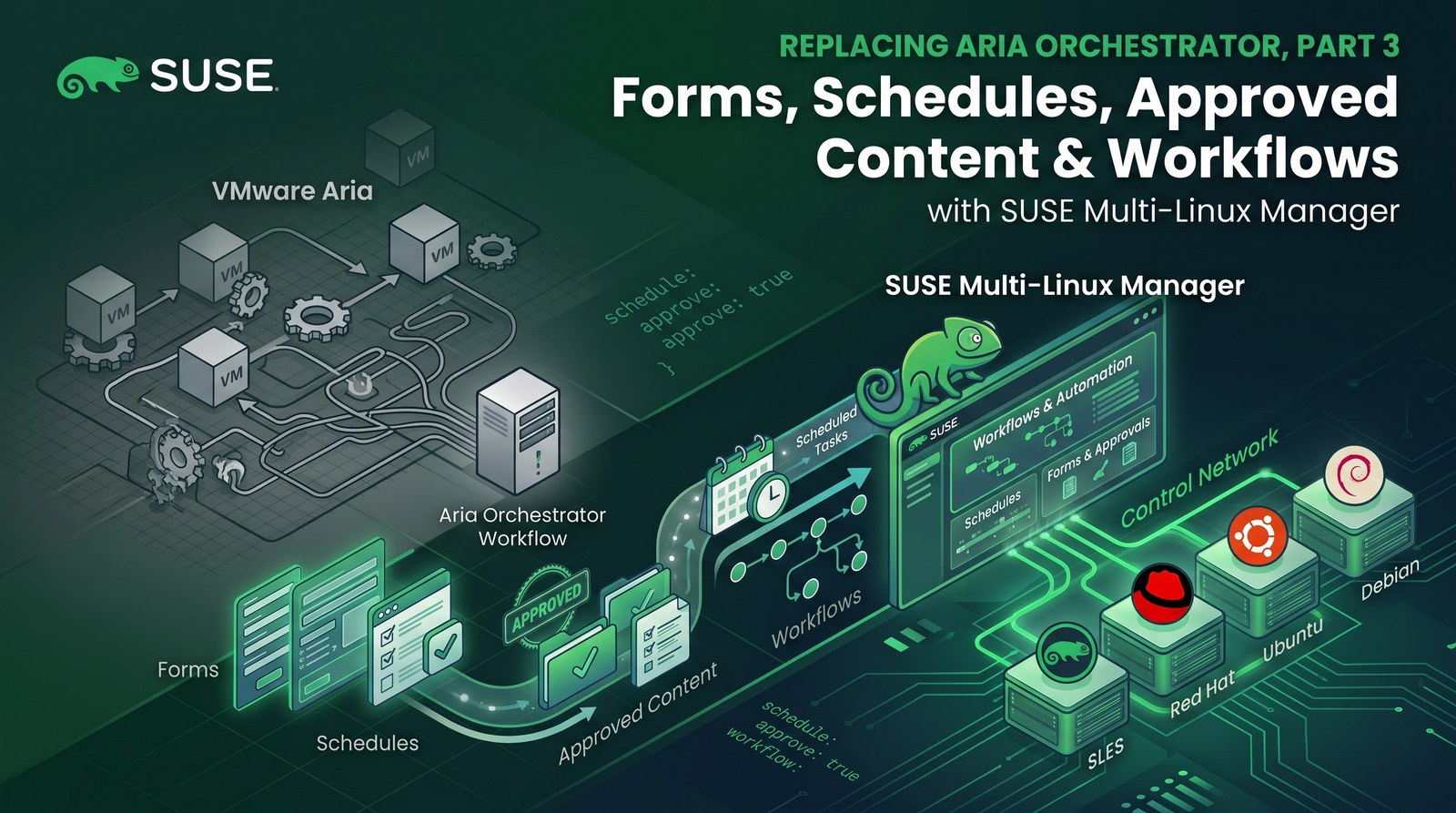
- Four Aria day-2 patterns map directly to SUSE Multi-Linux Manager features: catalog forms to formulas with forms, scheduled jobs to recurring actions, approved content per stage to Content Lifecycle Management, and orchestration workflows to action chains.
- The WordPress Salt state from Part 2 became a formula by adding one
form.yml; the state files did not change. Editing the form and applying a highstate changed the site’s tagline. - A recurring highstate on the
wordpresssystem group runs every hour and keeps every VM in the group at its defined state. - A frozen SLES 16.1 snapshot was built in
devand promoted toprod. Against that snapshot, SUSE Multi-Linux Manager flagged exactly one outdated package on the VM: a Valkey build taken from openSUSE Leap 16.0. - One action chain upgraded Valkey, reapplied the state and ran a smoke test, in that order. All files are in the demo repo.
Part 1 moved VM shape to Git, and Part 2 moved the guest configuration to SUSE Multi-Linux Manager with the same Salt state an Aria cloud template uses. What keeps customers on Aria after the first deployment, though, is day 2: self-service forms, scheduled jobs, approved content and multi-step workflows. This post rebuilds those four patterns on the same WordPress VM.
Aria patterns and their SUSE Multi-Linux Manager equivalents
| Aria pattern | SUSE Multi-Linux Manager feature | In this demo |
|---|---|---|
| Custom form / catalog inputs (Service Broker) | Formula with forms | WordPress site settings form on the wordpress group |
| Scheduled workflow or Automation Config job | Recurring action | Hourly highstate on the wordpress group |
| Approved content per environment | Content Lifecycle Management | SLES 16.1 snapshot, dev then prod |
| Orchestrator workflow with ordered steps | Action chain | Upgrade, highstate, smoke test |
As the demo VM I reused wp-01 from Part 2: openSUSE Leap 16.1 on SUSE Virtualization, registered to SUSE Multi-Linux Manager 5.2.1 and running WordPress, Apache, PHP 8 and MariaDB. Every step below was done with the server’s XML-RPC API; suma/part3.py contains the calls.
Step 1: Add an object cache from an older build
To give the later steps something to upgrade, I added an object cache to the WordPress stack: Valkey, the Redis-compatible store that ships in SLES 16. In salt/wordpress/init.sls (SUSE family only), the state now installs the package, creates a configuration file from the shipped example and runs the valkey@default service:
wordpress-cache-config:
  file.copy:
    - name: {{ os_map.cache_conf }}            # /etc/valkey/default.conf
    - source: {{ os_map.cache_conf }}.example
    - user: root
    - group: {{ os_map.cache_group }}
    - mode: '0640'
    - require:
      - pkg: wordpress-packages

wordpress-cache-service:
  service.running:
    - name: {{ os_map.cache_service }}         # valkey@default
    - enable: True
    - watch:
      - file: wordpress-cache-config
Before the state ran, a SUSE Multi-Linux Manager remote command installed Valkey from the openSUSE Leap 16.0 repository, as if the VM had been built from an older image:
zypper -n --gpg-auto-import-keys install --allow-vendor-change \
  https://download.opensuse.org/distribution/leap/16.0/repo/oss/x86_64/valkey-8.0.10-160000.2.1.x86_64.rpm
pkg.installed accepts any installed version, so the highstate configured and started the cache without upgrading it. The VM now runs valkey-8.0.10-160000.2.1, while the server’s SLES 16.1 channel carries 8.0.10-160100.2.1.
Step 2: Turn the state into a formula with a form
Aria users change application settings through catalog forms, not by editing code. SUSE Multi-Linux Manager does the same with formulas with forms: a Salt state plus a form.yml that renders as a web form, whose values become pillar data (custom formulas documentation). The WordPress state already reads its settings from the wordpress pillar, so the formula is the unchanged state plus this file (formulas/wordpress/form.yml):
wordpress:
  $type: group
  $name: WordPress site
  site_title:
    $name: Site title
    $default: Managed by SUSE Multi-Linux Manager
  tagline:
    $name: Tagline
    $default: Day-2 change rolled out with Salt
  admin_email:
    $name: Administrator e-mail
    $default: admin@example.com
suma/install-formula.sh copies the state to /srv/salt/wordpress/ and the form to /srv/formula_metadata/wordpress/ inside the server container with mgrctl cp. After that, the formula appears in the server’s formula list.
Formulas are assigned to systems or system groups. A wordpress group now carries the formula, and activation key 1-wordpress adds every new WordPress VM to the group:
gid = api.systemgroup.create(sk, "wordpress", "WordPress VMs: wordpress formula")["id"]
api.systemgroup.addOrRemoveSystems(sk, "wordpress", [sid], True)
api.formula.setFormulasOfGroup(sk, gid, ["wordpress"])
api.system.config.removeChannels(sk, [sid], ["wordpress"])            # the formula replaces the state channel
api.activationkey.removeConfigChannels(sk, ["1-wordpress"], ["wordpress"])
api.activationkey.addServerGroups(sk, "1-wordpress", [gid])
The Part 2 state channel had to go: the formula and the channel define the same state IDs, and Salt refuses to run a highstate with duplicate IDs. On the next highstate, all WordPress states ran from the formula (SLS: wordpress), and only the new cache configuration and service changed.
Changing the site is now a form edit. Under Systems > System Groups > wordpress > Formulas > Wordpress, I changed the tagline and saved:
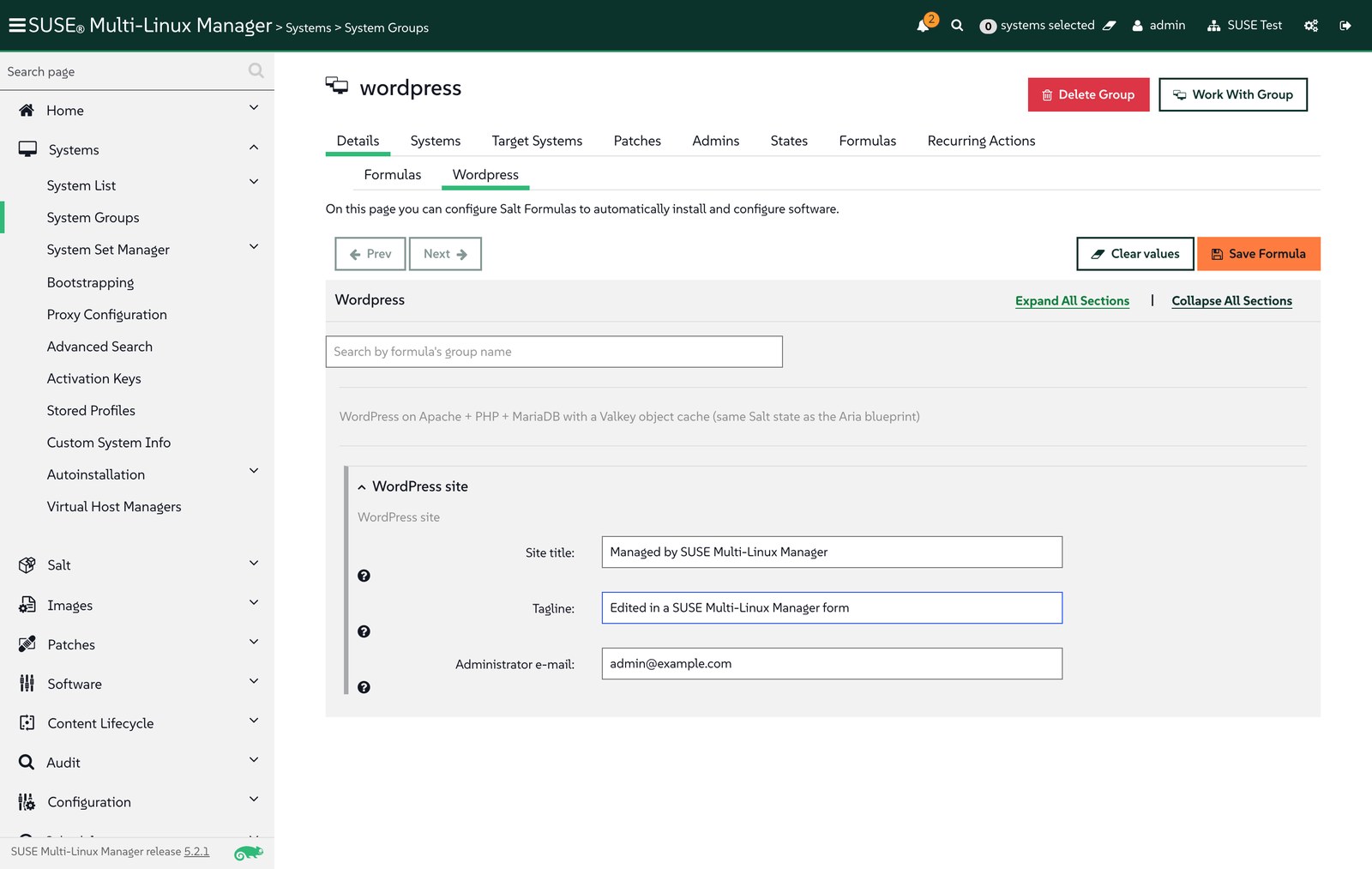
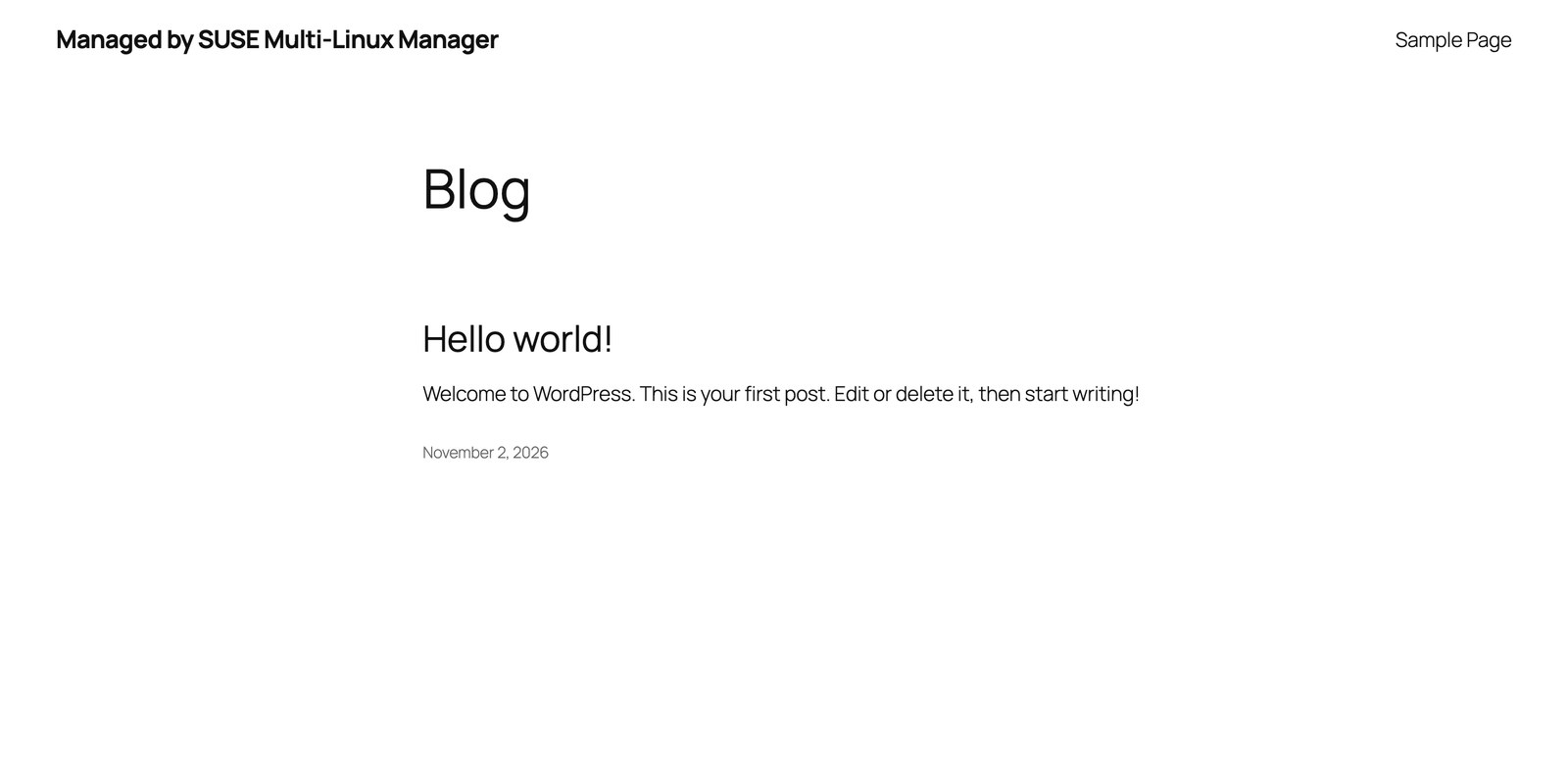
SUSE Multi-Linux Manager answered “Formula saved. Apply the Highstate for the changes to take effect.” After the highstate, one state had changed, wordpress-site-identity:
Step 3: Enforce the state on a schedule
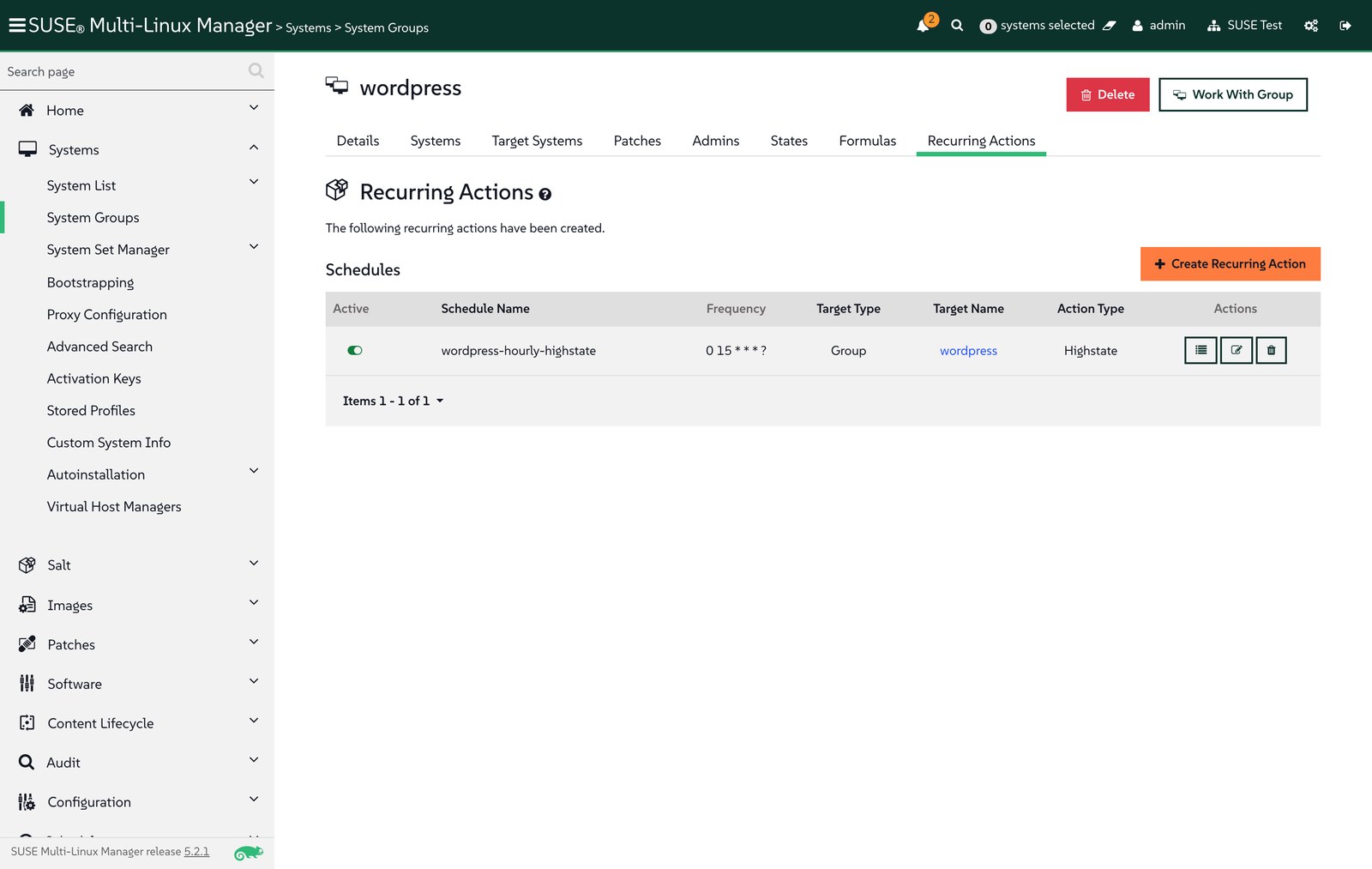
Aria customers schedule workflows and Automation Config jobs to keep systems in line. In SUSE Multi-Linux Manager, a recurring action on the group runs the highstate on every member, so a manual change on any WordPress VM is reverted within the hour (as shown in Part 2):
api.recurring.highstate.create(sk, {"entity_type": "group", "entity_id": gid,
                                    "name": "wordpress-hourly-highstate",
                                    "cron_expr": "0 15 * * * ?", "test": False})
Schedules use Quartz cron syntax: 0 15 * * * ? runs at a quarter past every hour. Setting "test": True instead turns the same schedule into a recurring dry run that only reports drift.
Step 4: Promote approved content from dev to prod
Production systems should only see packages that someone has approved. Content Lifecycle Management builds frozen copies of channels for each environment and promotes them in order. The wordpress project uses the SLES 16.1 base and tools channels as sources, with two environments:
api.contentmanagement.createProject(sk, "wordpress", "WordPress platform", "Frozen SLES 16.1 content, dev -> prod")
for ch in ("sle-product-sles-16.1-x86_64", "multi-linux-managertools-sle-16-x86_64-sles-16.1"):
    api.contentmanagement.attachSource(sk, "wordpress", "software", ch)
api.contentmanagement.createEnvironment(sk, "wordpress", "", "dev", "Development", "New content lands here")
api.contentmanagement.createEnvironment(sk, "wordpress", "dev", "prod", "Production", "Promoted after validation")
api.contentmanagement.buildProject(sk, "wordpress", "Initial snapshot of SLES 16.1 (beta) for WordPress")
api.contentmanagement.promoteProject(sk, "wordpress", "dev")
Building the project created wordpress-dev-* channels with all 7,900 SLES 16.1 packages and 59 tools packages, and promotion copied them to wordpress-prod-*:
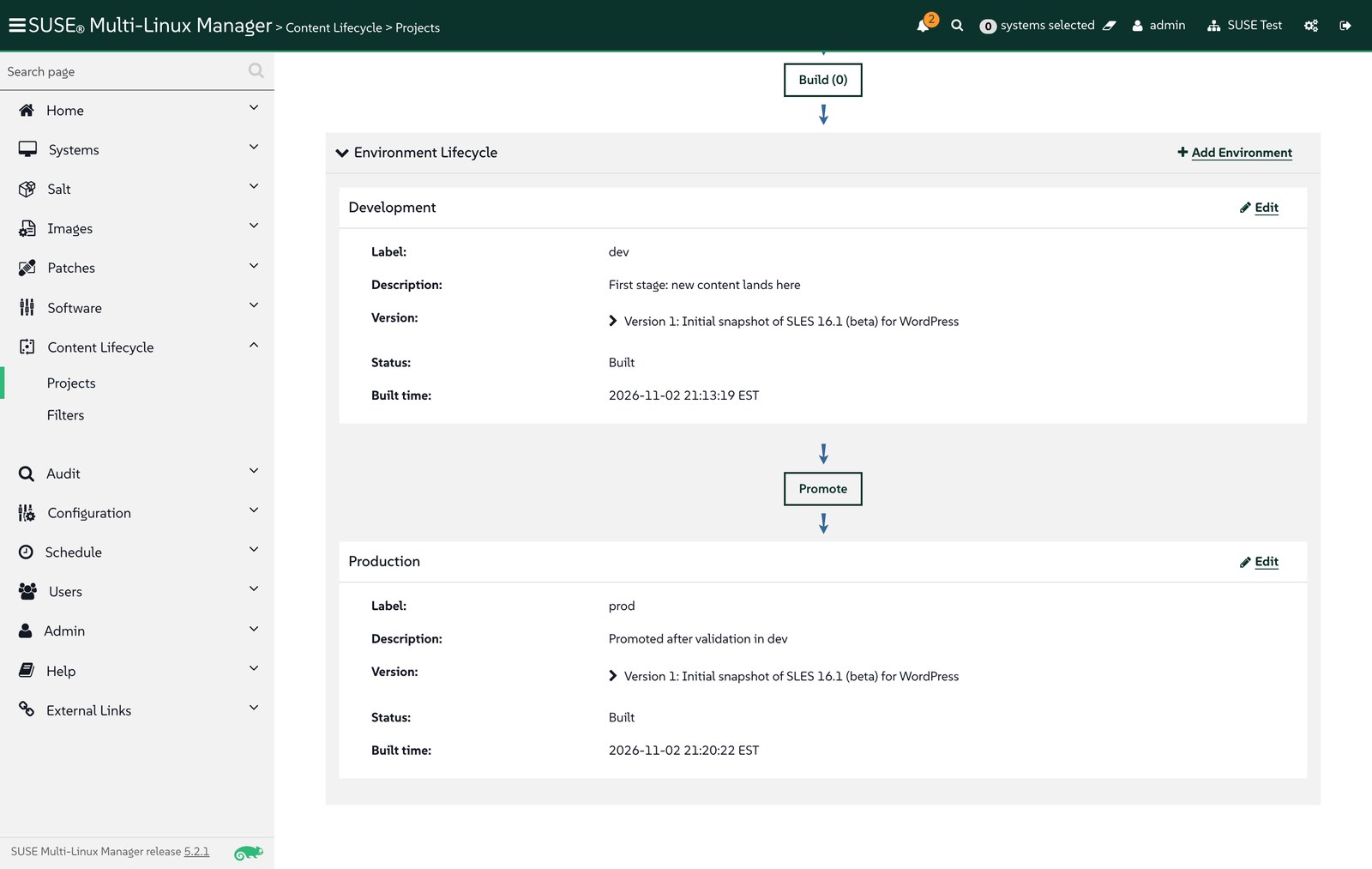
wp-01 and activation key 1-wordpress then moved to the prod channels, so new WordPress VMs also start on approved content:
api.system.scheduleChangeChannels(sk, sid, "wordpress-prod-sle-product-sles-16.1-x86_64",
                                  ["wordpress-prod-multi-linux-managertools-sle-16-x86_64-sles-16.1"], now)
api.activationkey.setDetails(sk, "1-wordpress", {"base_channel_label": "wordpress-prod-sle-product-sles-16.1-x86_64"})
After a package list refresh, the server compared the VM with the prod snapshot and found exactly one outdated package, the Valkey build from Step 1:
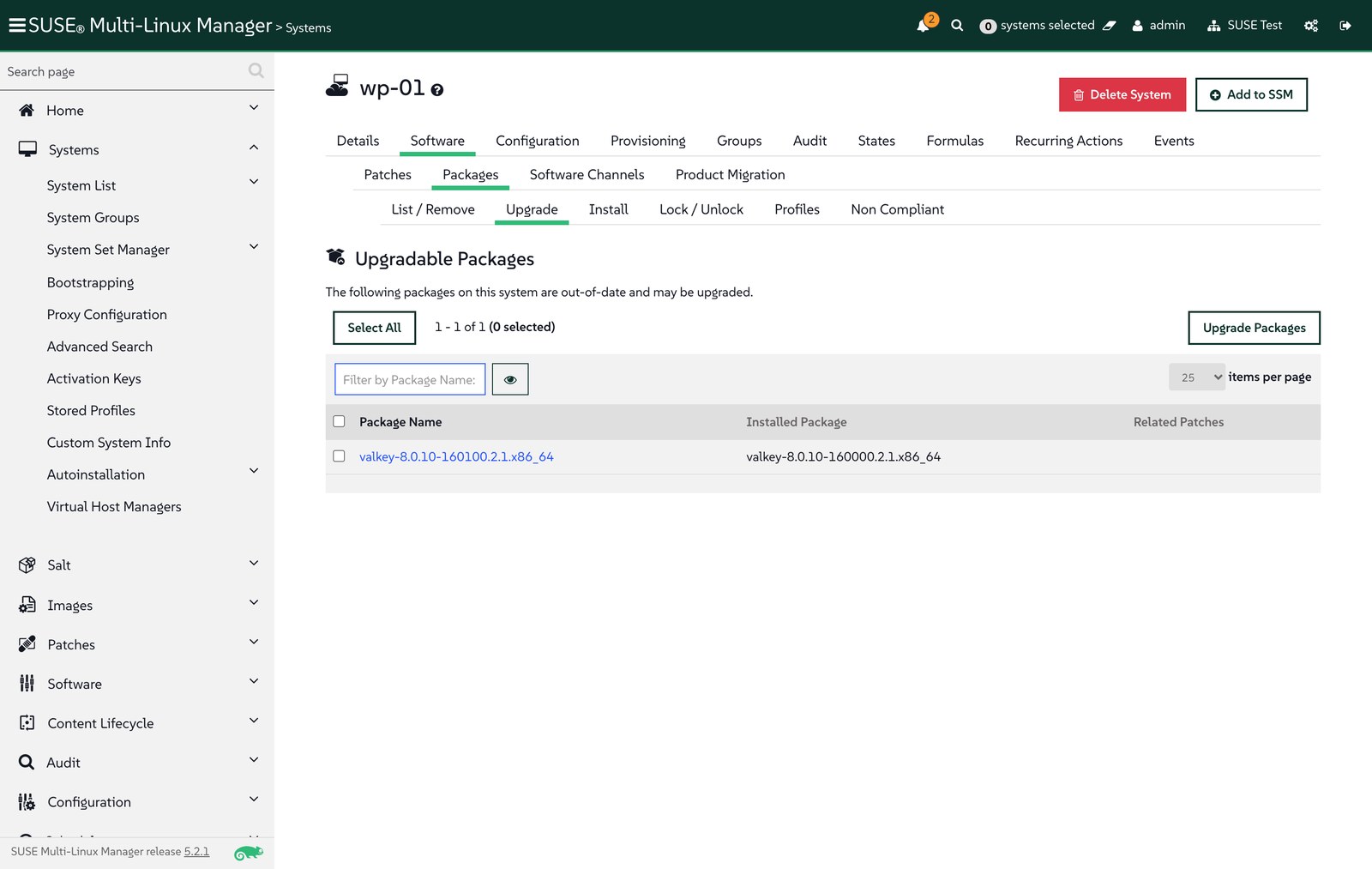
In a real lifecycle, new updates land in dev with the next build, get validated there, and reach prod systems only after promotion.
Step 5: Run maintenance as an action chain
An Aria Orchestrator workflow often strings steps together: patch, reconfigure, verify. An action chain does the same in SUSE Multi-Linux Manager: actions run in order on one or more systems, and each action depends on the one before it, so later steps do not run if an earlier one fails. The wordpress-maintenance chain has three steps:
api.actionchain.createChain(sk, "wordpress-maintenance")
api.actionchain.addPackageUpgrade(sk, sid, upgradable_package_ids, "wordpress-maintenance")
api.actionchain.addApplyHighstate(sk, sid, "wordpress-maintenance")
api.actionchain.addScriptRun(sk, sid, "wordpress-maintenance", "root", "root", 120,
                             base64.b64encode(smoke_test).decode())    # chain scripts are base64-encoded
api.actionchain.scheduleChain(sk, "wordpress-maintenance", now)
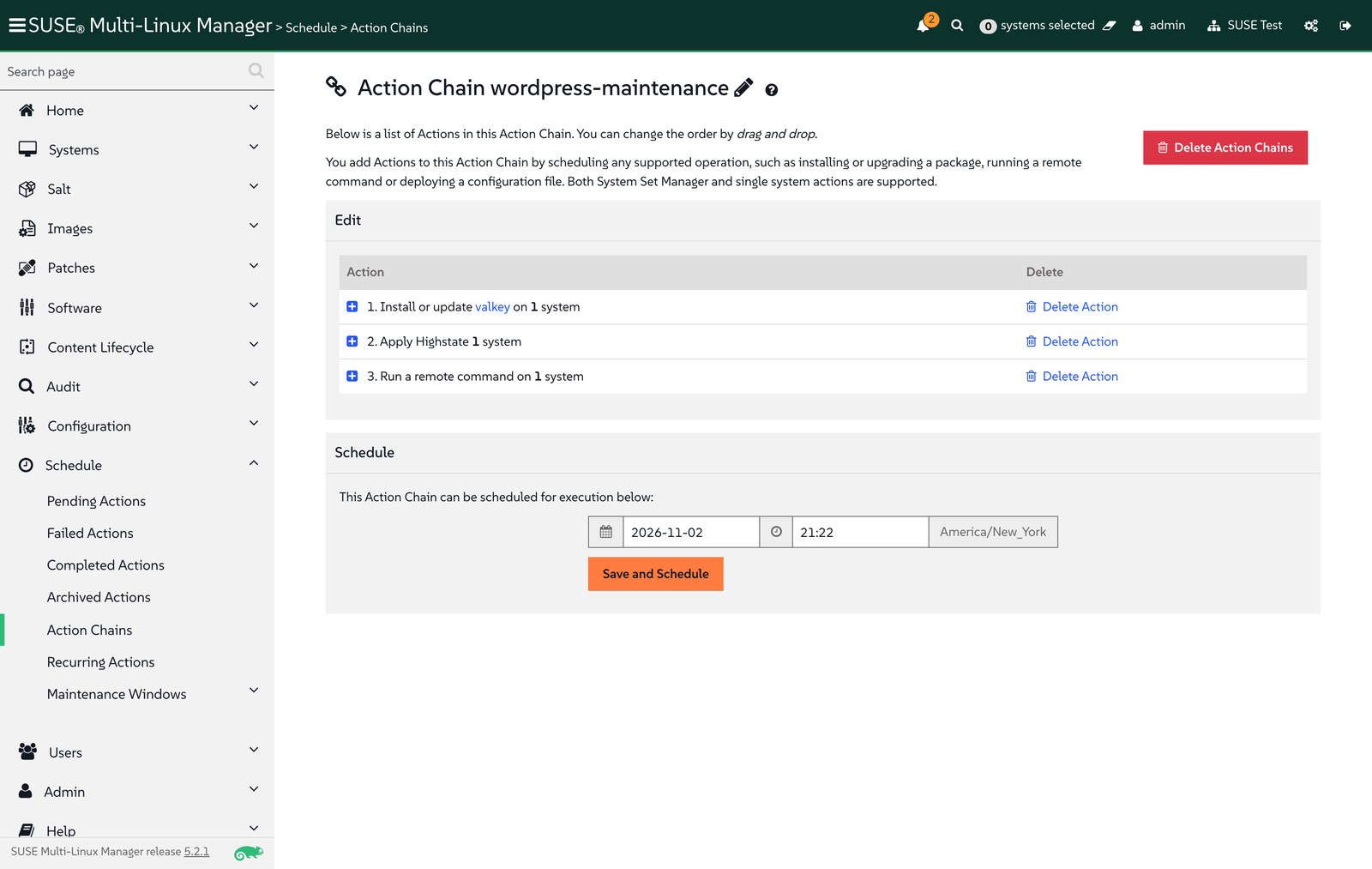
A smoke test (suma/smoke-test.sh) checks the site, the cache and the package version:
#!/bin/sh
# Calls the site with its configured Host header (WordPress redirects other host names to siteurl).
set -e
wp="php -d memory_limit=512M /usr/local/bin/wp --allow-root --path=/srv/www/wordpress"
host=$($wp option get siteurl); host=${host#http://}
echo "http: $(curl -s -o /dev/null -w '%{http_code}' -H "Host: $host" http://localhost/)"
echo "site: $($wp option get blogname)"
echo "cache: $(valkey-cli ping)"
echo "package: $(rpm -q valkey)"
All three steps succeeded. Valkey moved to the prod snapshot’s build, the highstate confirmed the rest of the stack, and the smoke test reported a healthy site:
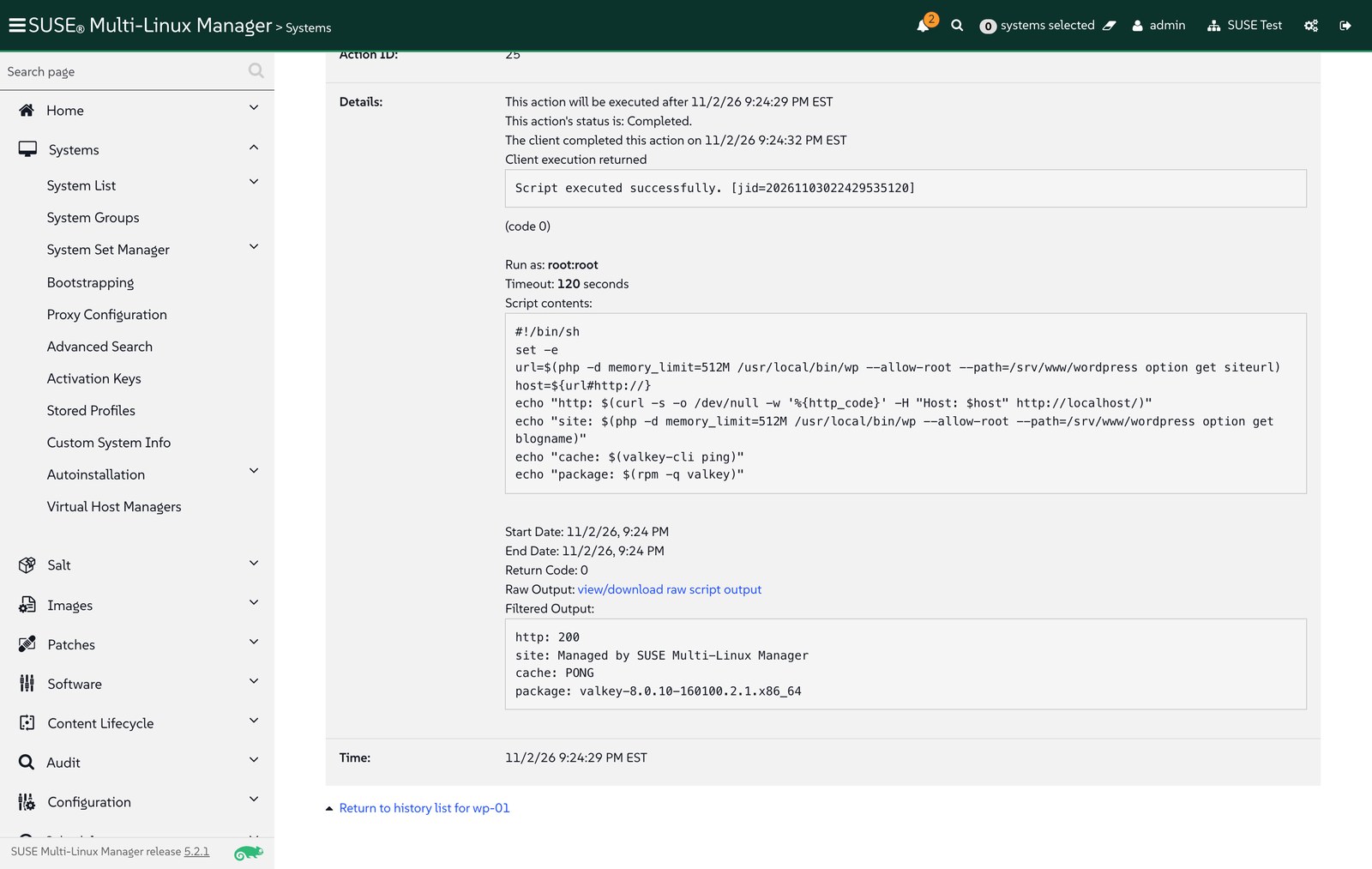
Afterwards, the system had no upgradable packages left.
Troubleshooting
- Highstate fails after adding the formula. If the state channel from Part 2 is still assigned, the formula and the channel define the same state IDs. Remove the channel from the systems and from the activation key before assigning the formula.
Illegal base64 characterfromactionchain.addScriptRun. Unlikesystem.scheduleScriptRun, the action chain call expects the script body base64-encoded.- Smoke test prints an empty page. WordPress redirects any host name other than its configured site URL, so
curl http://localhost/returns a redirect with no body. Send the site’s host name in theHostheader, or read values through WP-CLI. - Form fields are not visible in automated UI tests. The formula page renders its sections collapsed; select Expand All Sections first.
Takeaways
- Formulas with forms give operators an Aria-style form in front of the same Salt state that developers keep in Git.
- System groups are the unit of day-2 management: formulas, recurring highstates and activation keys all point at the
wordpressgroup, so new VMs get the same treatment automatically. - Content Lifecycle Management answers “which packages are approved for production?” with frozen, promoted snapshots, and the server shows exactly which systems lag behind them.
- Action chains cover the ordered, multi-step maintenance that teams currently build as Aria Orchestrator workflows.
- Together with Parts 1 and 2, the full lifecycle of a VM and its application now runs on SUSE Virtualization, Fleet and SUSE Multi-Linux Manager, with Git and Salt as the shared languages.