TL;DR
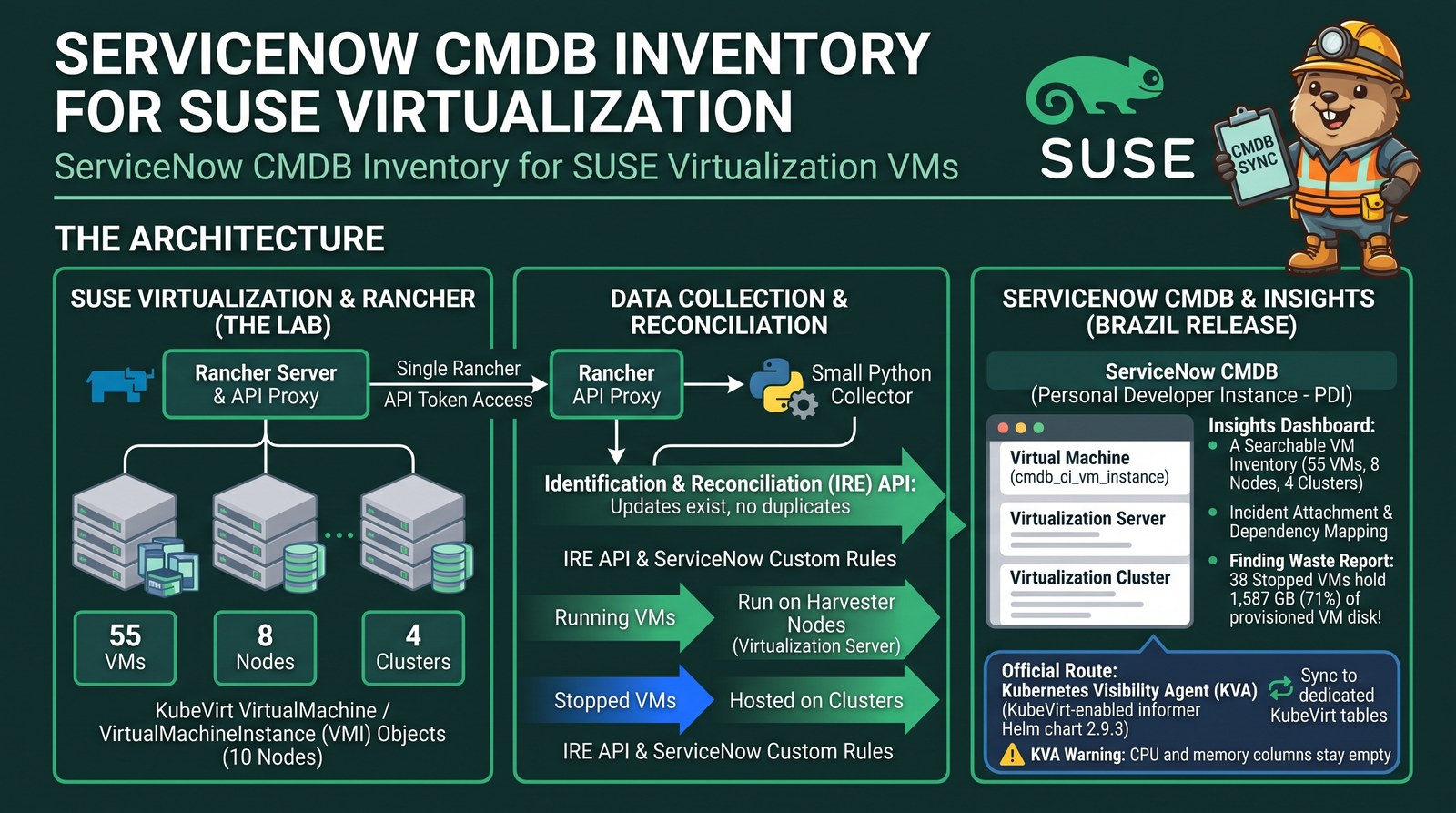
- A free ServiceNow Personal Developer Instance (PDI) can hold a real SUSE Virtualization (Harvester) inventory. Mine runs the Brazil release and tracks 55 VMs, 8 hypervisor nodes and 4 clusters.
- Route 1, a collector: a small Python script reads KubeVirt objects through the Rancher API proxy (one token for every cluster) and writes them with the Identification and Reconciliation (IRE) API. Re-runs update records instead of duplicating them.
- Route 2, the official agent: ServiceNow’s Kubernetes Visibility Agent (KVA) supports KubeVirt. Install the Store app, deploy the informer Helm chart with
kubevirt.enabled=true, and the cluster’s VMs land in dedicated KubeVirt tables within a minute. - KVA leaves vCPU, memory and disk count empty until you set the system property
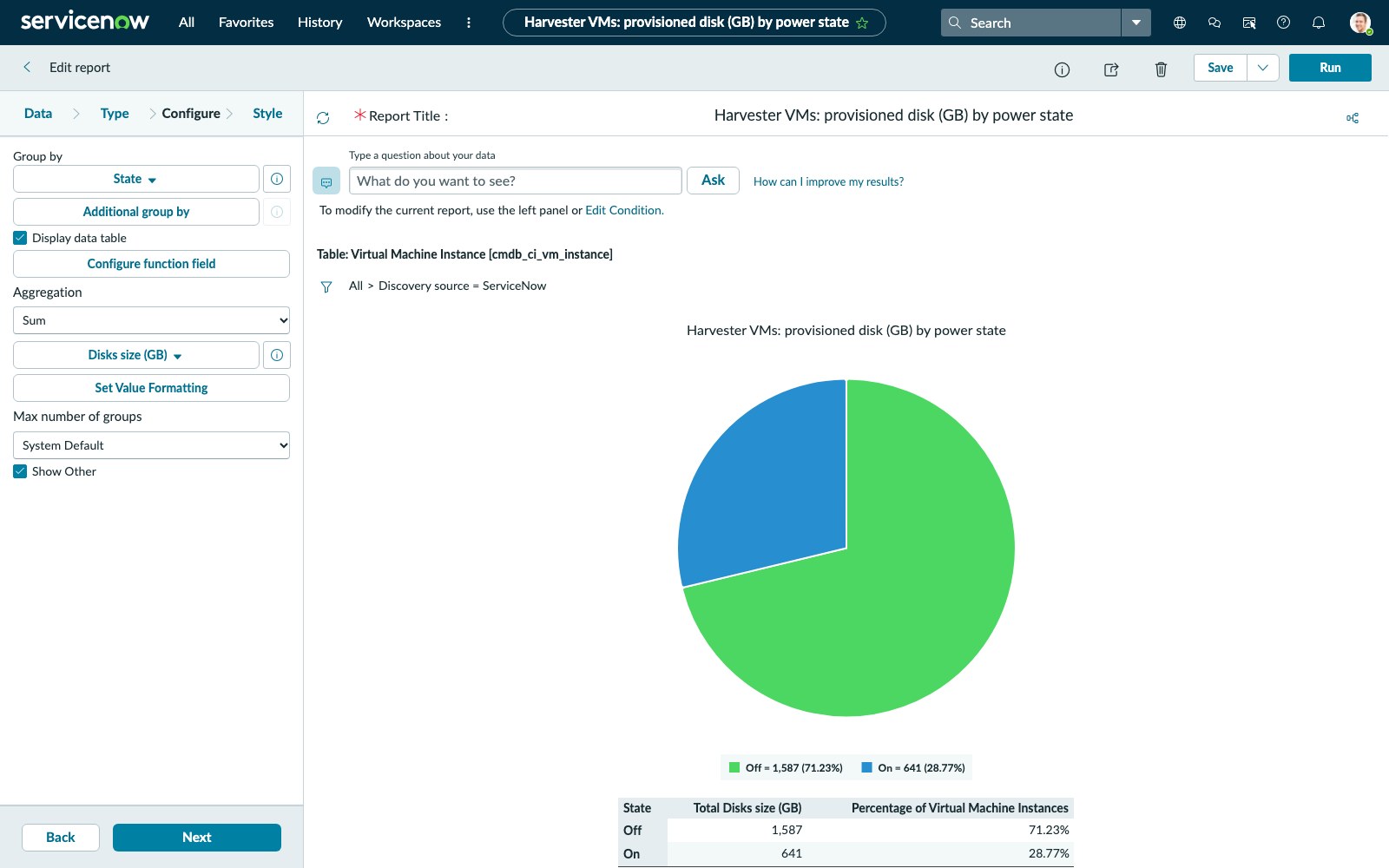
sn_acc_visibility.kubevirt.create_cmdb_ci_vm_instance=true. With it, each KubeVirt VM gets a standard VM Instance record with sizing, keyed on the same KubeVirt UID the collector uses. - Once the VMs are in, ServiceNow does the interesting work. My first report showed that 38 stopped VMs hold 1,587 GB (71%) of all provisioned VM disk.
Many enterprise IT teams run ServiceNow, and one of the first questions they ask about a new hypervisor is “will my VMs show up in the CMDB?” ServiceNow discovery has answered that for VMware for years. For KubeVirt-based platforms such as SUSE Virtualization, I wanted to see it end to end: a fresh ServiceNow instance, four Harvester clusters, and only public APIs and charts.
Lab setup
| Component | Version / size |
|---|---|
| ServiceNow | Personal Developer Instance, Brazil release |
| SUSE Virtualization (Harvester) | retail-store: v1.9.0, 3 nodes; disaster-recovery: v1.10.0-rc1, 3 nodes; far-edge and harvester-ai: v1.10.0-rc1, 1 node each |
| Rancher | manages all four clusters; the collector talks only to Rancher |
| KVA | Store app 3.16.1, informer Helm chart and image 2.9.3 |
| VMs | 55 (17 running, 38 stopped): Linux, Windows Server 2022/2025, a SQL Server failover cluster, demo apps |
Step 1: Get a free ServiceNow instance
Sign up for a ServiceNow ID at developer.servicenow.com.
Click Request instance and pick a release. I took the latest, Brazil.
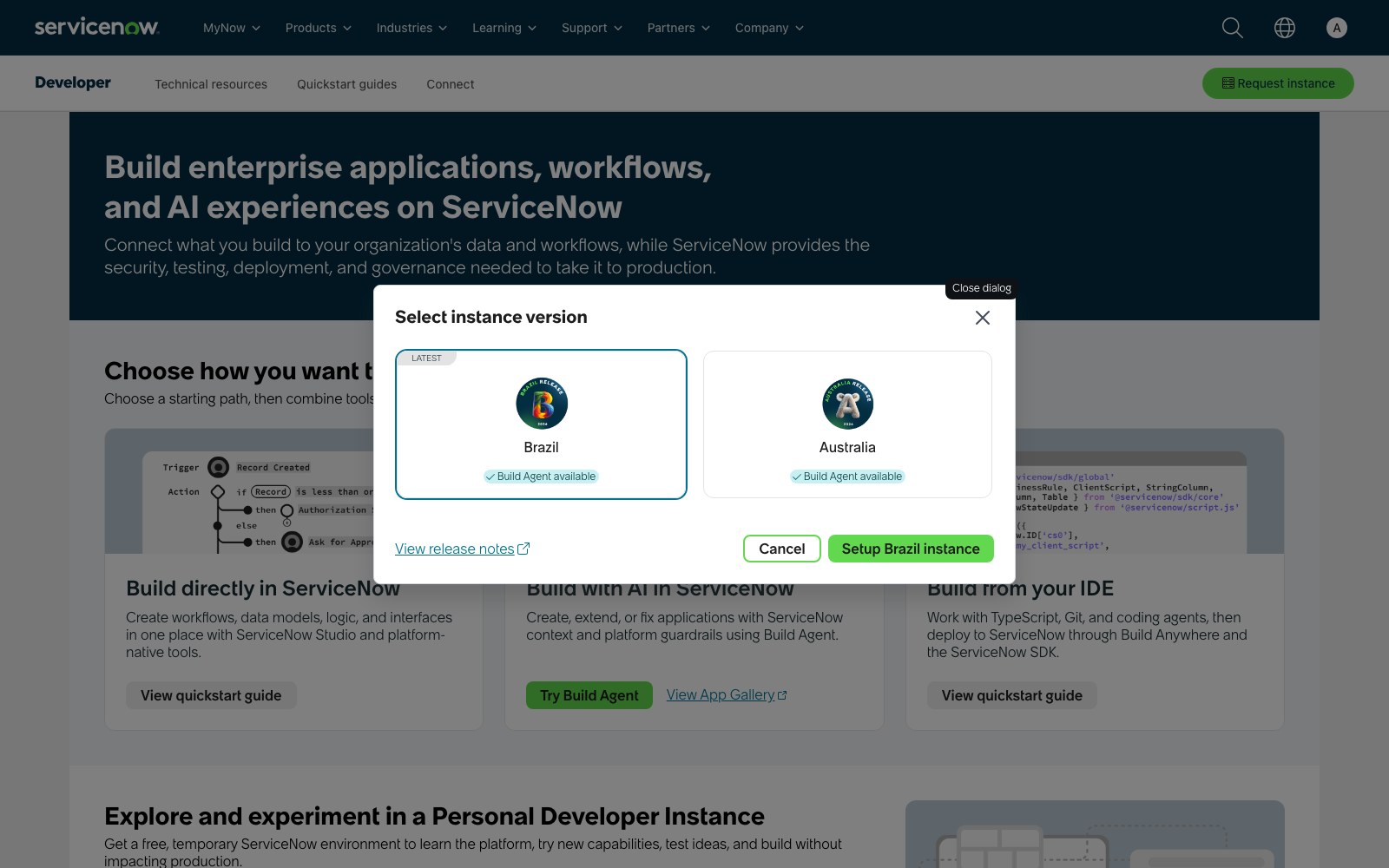
Wait a few minutes until the portal shows the instance as Online, then reveal the
adminpassword on the portal banner.Check that the REST API answers:
$ export SN=https://devNNNNNN.service-now.com SN_AUTH=admin:<password>
$ curl -s -u $SN_AUTH "$SN/api/now/table/cmdb_ci_vm_instance?sysparm_limit=1" -o /dev/null -w '%{http_code}\n'
200
Every sign-in to the developer portal asks for a 6-digit code sent by email; your instance has its own admin login without MFA, so scripts use basic auth against devNNNNNN.service-now.com. Idle instances get reclaimed by the developer program, so treat a PDI as a test bed, not a long-term CMDB.
Route 1: Collector and the IRE API
Step 2: Choose the data model
ServiceNow enforces some relationships. A cmdb_ci_vm_instance (Virtual Machine Instance) is a dependent class, so IRE refuses to create one unless the payload also names the CI that hosts it. My first push returned:
MISSING_DEPENDENCY: In payload no relations defined for dependent class [cmdb_ci_vm_instance]
that matches any containment/hosting rules: [cmdb_ci_vm_instance >> Runs on >> cmdb_ci_virtualization_server,
cmdb_ci_vm_instance >> Hosted on >> cmdb_ci_logical_datacenter, cmdb_ci_vm_instance >> Runs >> cmdb_ci_computer]
Private clouds such as OpenStack usually map to cmdb_ci_logical_datacenter, but on a PDI without Cloud Discovery that class is dependent too, and so is its parent (the cloud service account), with no rules shipped for either. What worked was stock classes plus one rule:
| Harvester object | CMDB class | Relationship |
|---|---|---|
| Cluster | cmdb_ci_cluster | — |
| Node (KVM hypervisor) | cmdb_ci_virtualization_server | cluster Members node |
| Running VM | cmdb_ci_vm_instance | VM Runs on its node (out-of-the-box rule) |
| Stopped VM | cmdb_ci_vm_instance | VM Hosted on its cluster (custom rule) |
A stopped KubeVirt VM has no node; it belongs to the cluster until the scheduler starts it somewhere. Add the rule in CI Class Manager → Virtual Machine Instance → Dependent Relationships, or with one REST call (5f985e0e… is the sys_id of the Hosted on::Hosts relationship type):
$ curl -s -u $SN_AUTH -H 'Content-Type: application/json' "$SN/api/now/table/cmdb_metadata_hosting" \
    -d '{"parent_type":"cmdb_ci_vm_instance","child_type":"cmdb_ci_cluster",
         "rel_type":"5f985e0ec0a8010e00a9714f2a172815"}'
List the parents a class accepts to confirm. On my instance, after the rule and the KVA install (which adds the Managed by Kubernetes cluster rule):
$ curl -s -u $SN_AUTH -G "$SN/api/now/table/cmdb_metadata_hosting" \
    --data-urlencode "sysparm_query=parent_type=cmdb_ci_vm_instance" \
    --data-urlencode "sysparm_fields=child_type,rel_type.name" \
    | jq -r '.result[] | "\(.["rel_type.name"])  \(.child_type)"'
Managed by::Manages  cmdb_ci_rubrik_cluster
Runs on::Runs  cmdb_ci_virtualization_server
Hosted on::Hosts  cmdb_ci_logical_datacenter
Hosted on::Hosts  cmdb_ci_cluster
Runs on::Runs  cmdb_ci_computer
Managed by::Manages  cmdb_ci_kubernetes_cluster
Every VM needs exactly one parent
In ServiceNow a VM can’t exist on its own: like a mailing address, it must name the one place it lives, its parent CI. Send a VM with no parent and IRE rejects it (
MISSING_DEPENDENCY); send two and IRE rejects it too (MULTIPLE_DEPENDENCIES). With Harvester, which parent to send depends on the VM’s state:
- Running VM:
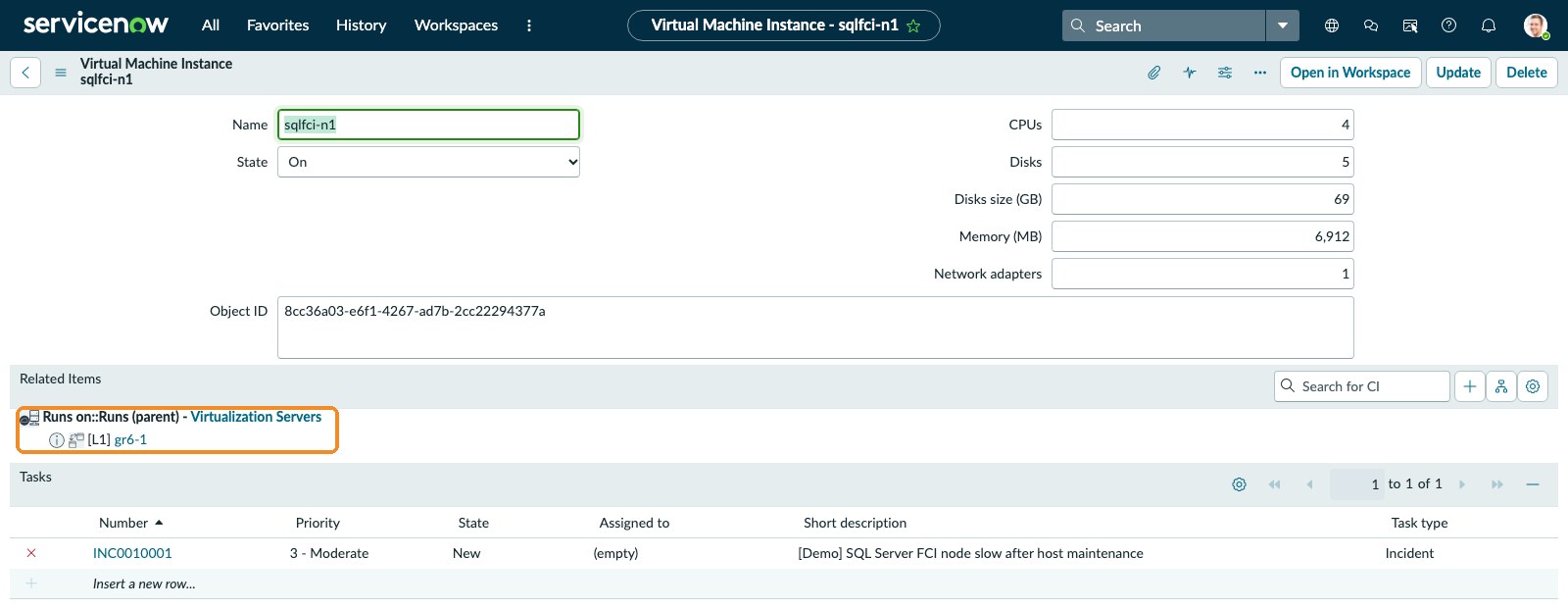
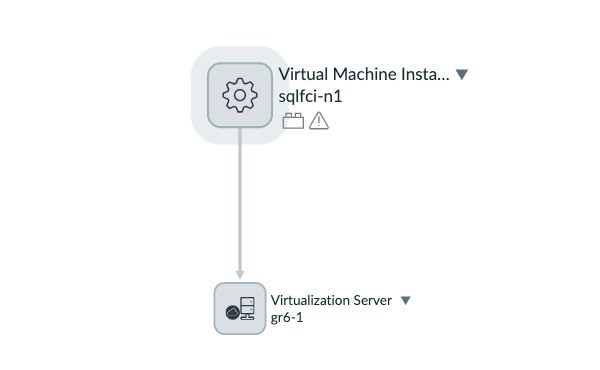
sqlfci-n1runs on nodegr6-1, so its parent isgr6-1(Runs on).- Stopped VM:
hana-prodisn’t on any node, because KubeVirt picks a node only when a VM starts. Its parent is its cluster,harvester-ai(Hosted on, the custom rule above).When
hana-prodstarts, the next collector run moves its parent from the cluster to the node it landed on.
Step 3: Read the VMs through Rancher
Rancher already holds a token that reaches every downstream cluster, so the collector needs no per-cluster kubeconfig: it lists the Harvester clusters, skips the ones that aren’t active, then reads each one through the proxy at /k8s/clusters/<id>. Here are the same calls with curl:
$ RANCHER=https://<rancher-host> TOKEN=<rancher-api-token>
$ curl -s -H "Authorization: Bearer $TOKEN" "$RANCHER/v3/clusters" \
    | jq -r '.data[] | select(.provider=="harvester") | "\(.id)  \(.name)  \(.state)"'
c-6mx2l  altra-ai  unavailable
c-d9nf5  disaster-recovery  active
c-sx2sr  harvester-ai  active
c-tjxjl  retail-store  active
c-v74rq  far-edge  active
$ curl -s -H "Authorization: Bearer $TOKEN" \
    "$RANCHER/k8s/clusters/c-v74rq/apis/harvesterhci.io/v1beta1/settings/server-version" | jq -r .value
v1.10.0-rc1
From each cluster the collector reads:
kubevirt.io/v1VirtualMachines: vCPUs (cores × sockets × threads), guest memory, NICs, volumes.- VirtualMachineInstances: node, IP, MAC, and the guest OS reported by the QEMU guest agent.
- PersistentVolumeClaims: each VM’s total disk size.
- Nodes: CPU, memory, OS image, kernel and system UUID for the hypervisor records.
- the
harvesterhci.io/v1beta1server-version setting for the Harvester version.
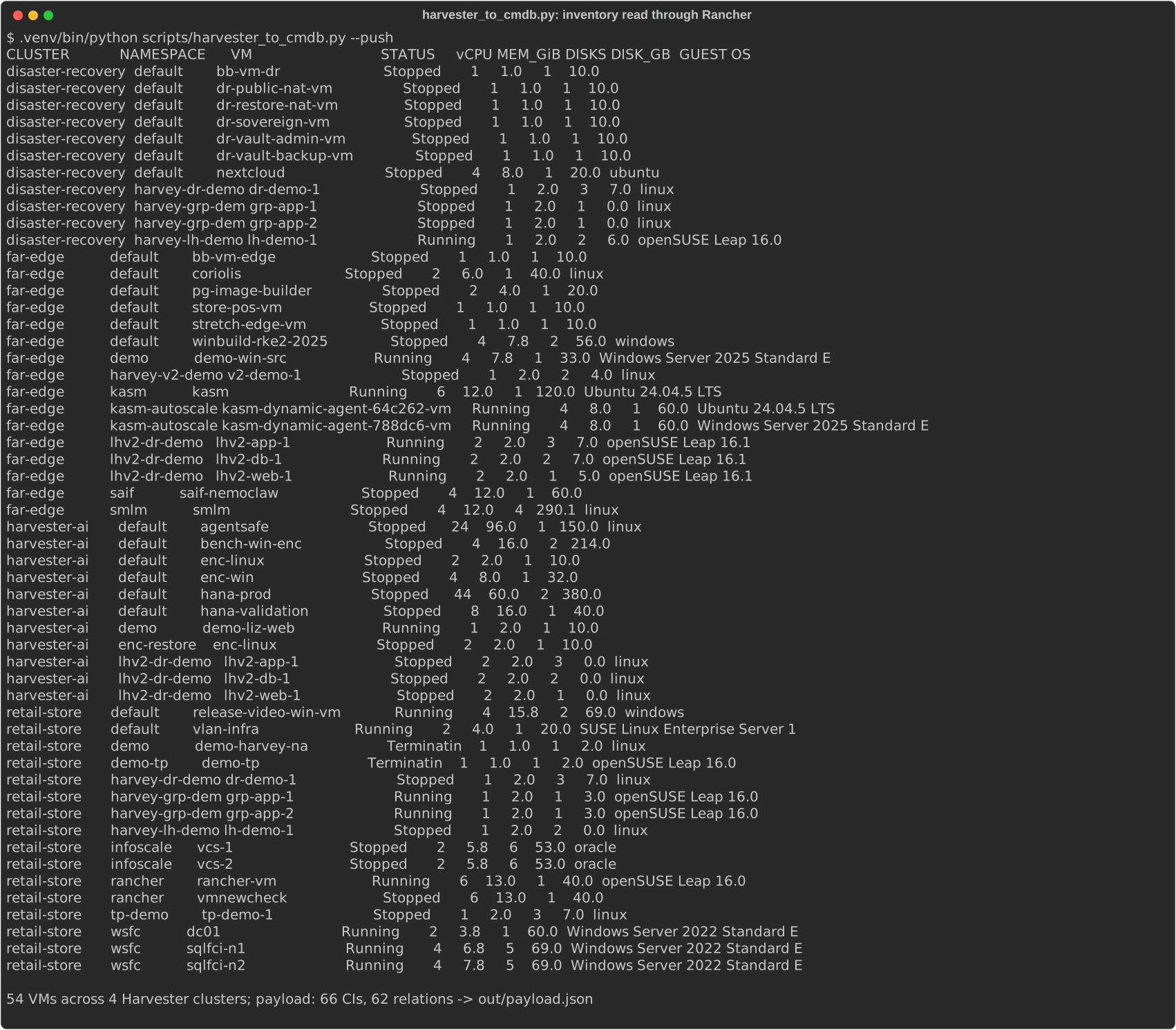
All calls are read-only. Before it touches ServiceNow, the collector prints the inventory (this capture has 54 VMs; one more appeared before the final push):
Step 4: Push through Identification and Reconciliation
IRE (POST /api/now/identifyreconcile) is the API ServiceNow’s own discovery uses. It matches each incoming record against the CMDB with identification rules (for VMs, object_id, which the collector fills with the KubeVirt UID), then inserts, updates or leaves it alone, so a second run creates nothing new. One VM in the payload:
{
  "className": "cmdb_ci_vm_instance",
  "values": {
    "name": "sqlfci-n1", "object_id": "8cc36a03-e6f1-4267-ad7b-2cc22294377a",
    "state": "on", "cpus": 4, "memory": 6912, "disks": 5, "disks_size": 69,
    "nics": 1, "guest_os_fullname": "Windows Server 2022 Standard Evaluation"
  }
}
IRE drops the whole payload when one item fails, so one bad VM would block the other 54. My collector sends the clusters and nodes first, then one VM per call:
$ ./harvester_to_cmdb.py --push
  ok   clusters+nodes                     INSERT,NO_CHANGE,UPDATE
  ok   bb-vm-dr                           NO_CHANGE,UPDATE
  ok   dr-public-nat-vm                   INSERT,UPDATE
  ok   dr-restore-nat-vm                  INSERT,UPDATE
  …
IRE batches: 55 ok, 0 failed
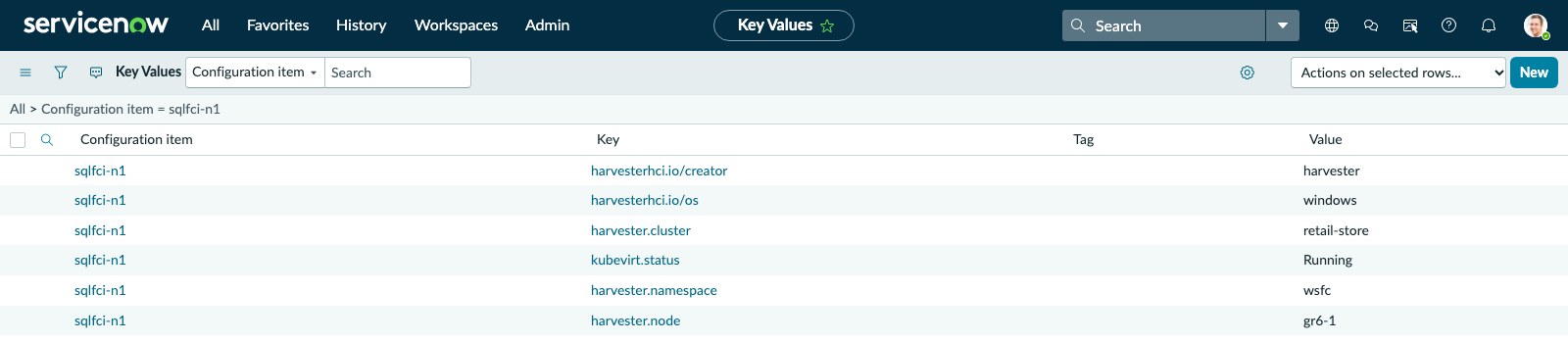
A full run over the four clusters takes about 30 seconds. Kubernetes context without a CMDB column (cluster, namespace, node, KubeVirt status and the harvesterhci.io/* labels) goes into cmdb_key_value, the key/value table ServiceNow also uses for cloud tags. IRE can write those as lookup items only after you add another identification rule, so the collector upserts them with the Table API.
Verify the result with the aggregate API. Because the collector runs as admin, this filter counts only its records:
$ curl -s -u $SN_AUTH -G "$SN/api/now/stats/cmdb_ci_vm_instance" \
    --data-urlencode "sysparm_query=sys_created_by=admin" --data-urlencode "sysparm_count=true" \
    --data-urlencode "sysparm_group_by=state" --data-urlencode "sysparm_sum_fields=disks_size" \
    | jq -r '.result[] | "\(.groupby_fields[0].value)  \(.stats.count) VMs  \(.stats.sum.disks_size) GB"'
off  38 VMs  1587 GB
on  17 VMs  641 GB
What ServiceNow gives you once the VMs are in
Searchable inventory
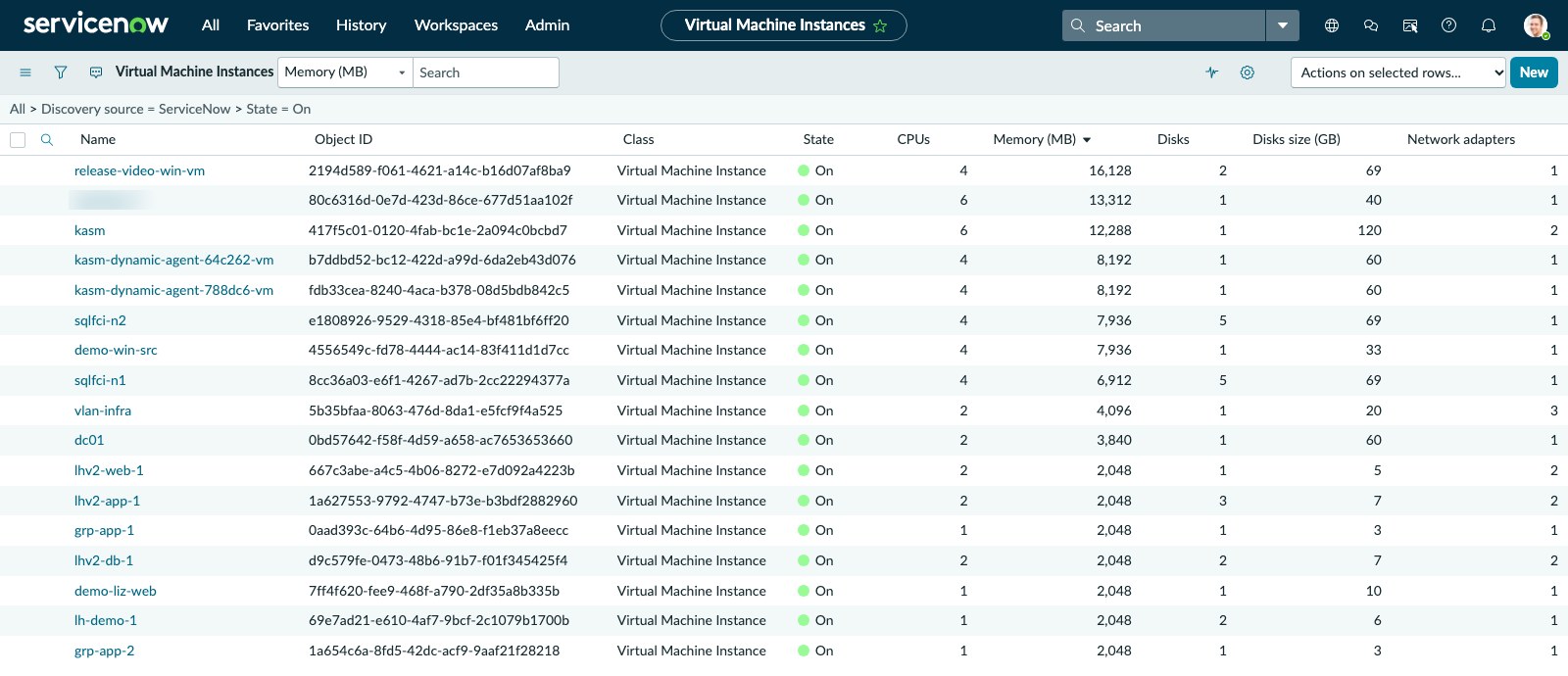
Every Harvester VM is a standard Virtual Machine Instance record, so list filters, grouping, exports and access control work exactly as they do for VMware or cloud VMs. Running VMs, largest memory first:
Relationships and incidents
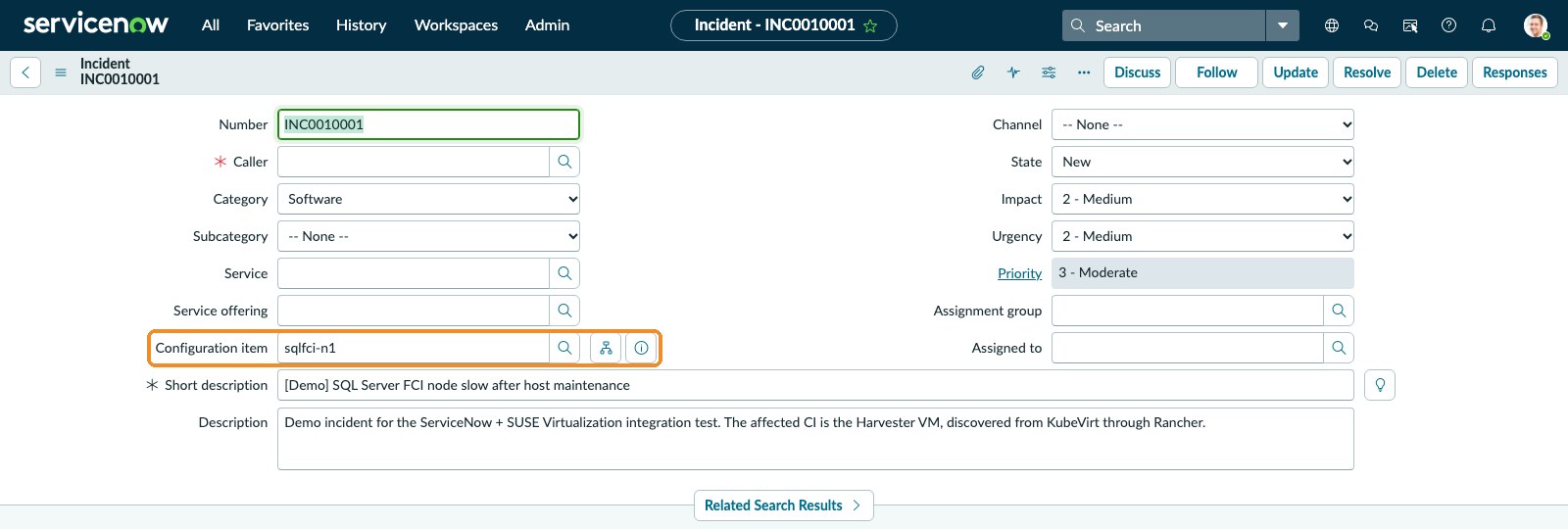
The VM form shows what the VM runs on and every incident, change or problem that points at it. I opened a demo incident against one node of the SQL Server failover cluster:
ServiceNow’s dependency map draws the same relationship, and grows more useful once applications and business services sit on top of the VMs:
Kubernetes context sits next to the VM as key/value pairs:
Reports that find waste
Grouping provisioned disk by power state shows that stopped VMs hold 1,587 GB, 71% of all VM disk across the four clusters:
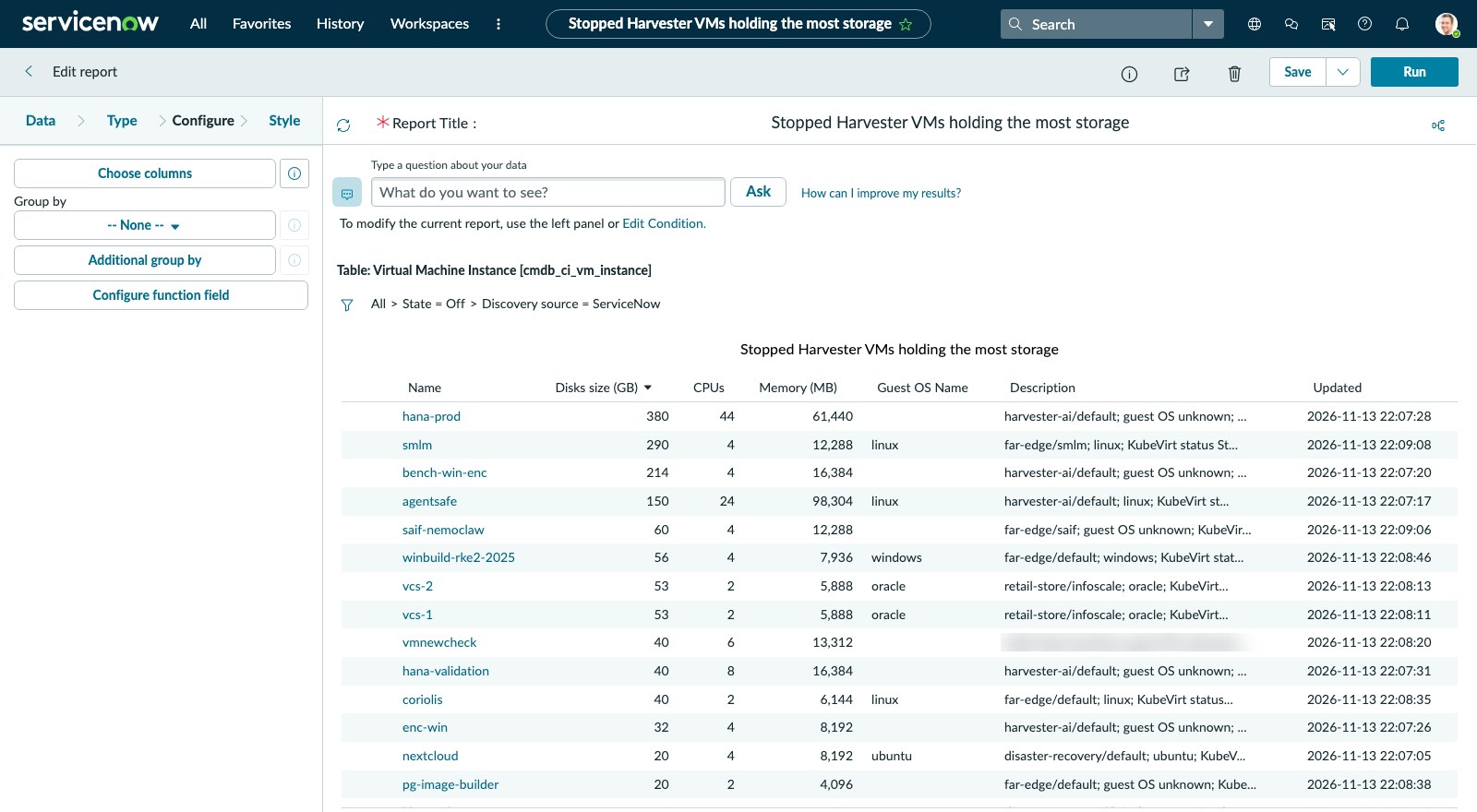
A list report sorted by disk size turns that into a cleanup queue, led by the 380 GB hana-prod VM and a 290 GB management server, both powered off:
Data-quality gaps
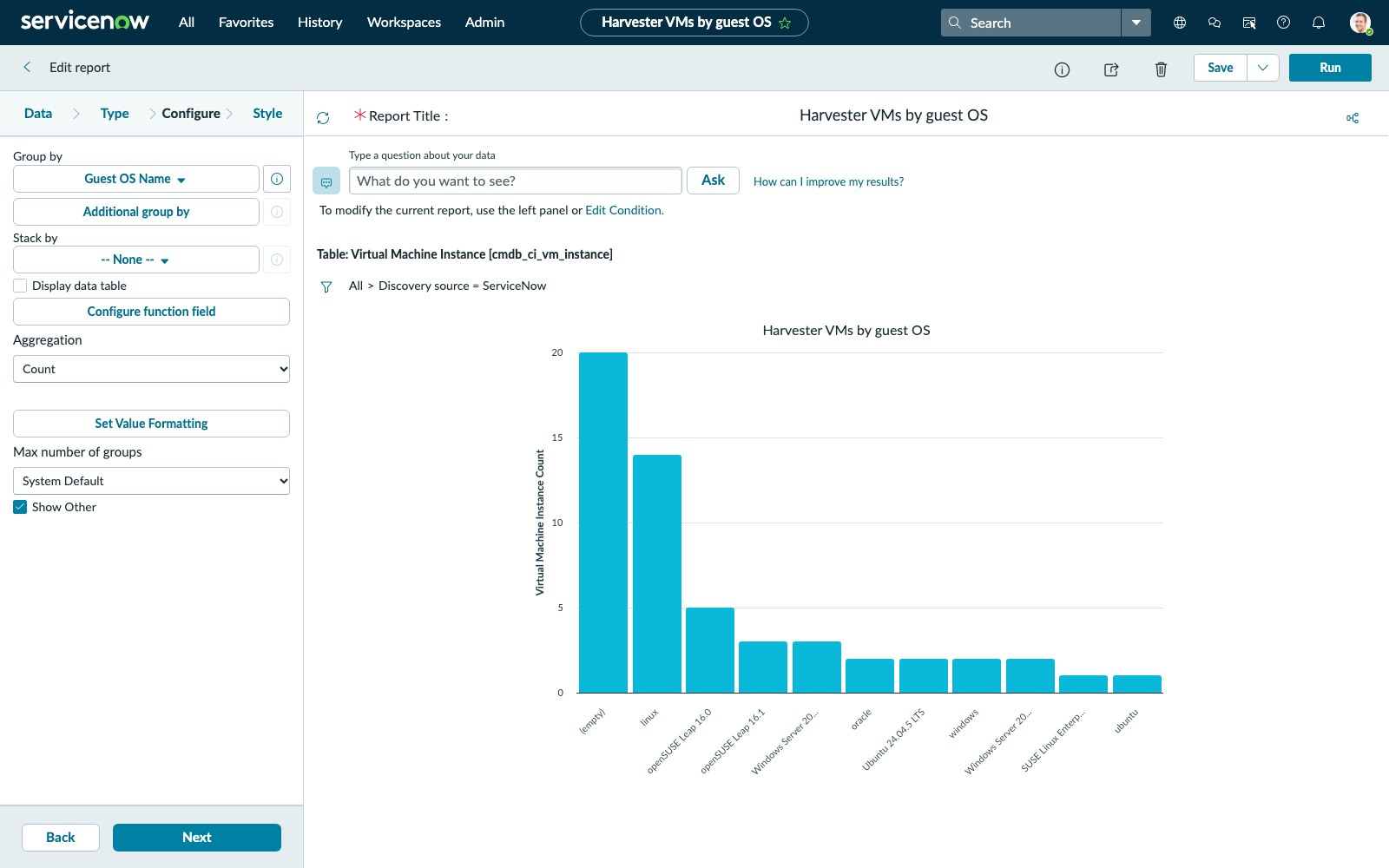
In a guest-OS report, the largest bucket is (empty). KubeVirt knows the exact guest OS only while a VM runs with the QEMU guest agent; stopped VMs and VMs without the agent fall back to the coarse harvesterhci.io/os label (linux, windows) or nothing. In the CMDB that becomes a to-do list: add the guest agent to your templates.
Route 2: Kubernetes Visibility Agent
KVA is ServiceNow’s own answer for Kubernetes: a Store app on the instance plus an informer Deployment in each cluster that watches the API server and streams changes to the CMDB.
Step 5: Install the Store app
KVA appears in a PDI’s Application Manager. Install it from there, or start the install through the CI/CD API and poll the progress link it returns:
$ curl -s -u $SN_AUTH -X POST \
    "$SN/api/sn_cicd/app_repo/install?scope=sn_acc_visibility&version=3.16.1" | jq -r .result.links.progress.url
https://devNNNNNN.service-now.com/api/sn_cicd/progress/46f969e1936c13109a24f5befaba10f8
$ curl -s -u $SN_AUTH "$SN/api/sn_cicd/progress/46f969e1936c13109a24f5befaba10f8" \
    | jq -r '.result | "\(.status_label) \(.percent_complete)%"'
Successful 100%
Expect a long install
On my PDI the install took about 100 minutes, most of it parked at 77% while dependencies such as Discovery installed. Afterwards the instance answered roughly half of all requests with HTTP 500 for over an hour, the informer’s included.
Create an integration user with the discovery_admin and mid_server roles for the informer. I named mine kva.informer.
Step 6: Deploy the informer with KubeVirt enabled
ServiceNow publishes the informer Helm chart openly. Version 2.9.3 has KubeVirt built in: kubevirt.enabled=true adds read-only get/list/watch RBAC on virtualmachines, virtualmachineinstances and CDI datavolumes, and maps them into the cmdb_kubevirt_* tables. Rendered, it’s one Deployment, a ServiceAccount and the roles, with nothing privileged.
$ kubectl create namespace servicenow
$ kubectl -n servicenow create secret generic k8s-informer-cred-devNNNNNN \
    --from-literal=.user=kva.informer --from-literal=.password='<password>'
$ helm repo add informer-helm \
    https://install.service-now.com/glide/distribution/builds/package/informer/informer-helm/repo
$ helm install k8s-informer informer-helm/informer-helm -n servicenow \
    --set acceptEula=Y --set instance.name=devNNNNNN --set clusterName=far-edge \
    --set kubevirt.enabled=true --set resyncMin=10
$ kubectl -n servicenow logs deploy/k8s-informer-devNNNNNN | grep -E 'Registering|synced'
Registering informer for additional resource kubevirt.io/v1, Resource=virtualmachines
Registering informer for additional resource kubevirt.io/v1, Resource=virtualmachineinstances
Registering informer for additional resource cdi.kubevirt.io/v1beta1, Resource=datavolumes
…
Informer synced for resource :  datavolumes
Informer synced for resource :  virtualmachines
Informer synced for resource :  virtualmachineinstances
resyncMin=10 makes the informer re-list every resource every 10 minutes. With the default (0) it lists only at start-up and then sends changes, so instance-side settings reach existing VMs only at the next full discovery. I added it with helm upgrade --reuse-values --set resyncMin=10 after the first install.
Within a minute the CMDB held the single-node far-edge cluster:
| Table | Records |
|---|---|
cmdb_ci_kubernetes_cluster | 1 |
cmdb_ci_kubernetes_node | 1 |
cmdb_kubevirt_virtual_machine | 16 |
cmdb_kubevirt_virtual_machine_instance | 8 (the running VMs) |
cmdb_kubevirt_data_volume | 21 |
cmdb_ci_kubernetes_pod / _workload | 155 / 193 |
All 16 VMs matched the collector’s list for that cluster, UID for UID. KVA also caught a Kasm autoscaler VM that started between the two runs, which is the advantage of an agent that watches instead of polling.
Step 7: Fill in vCPU, memory and disks
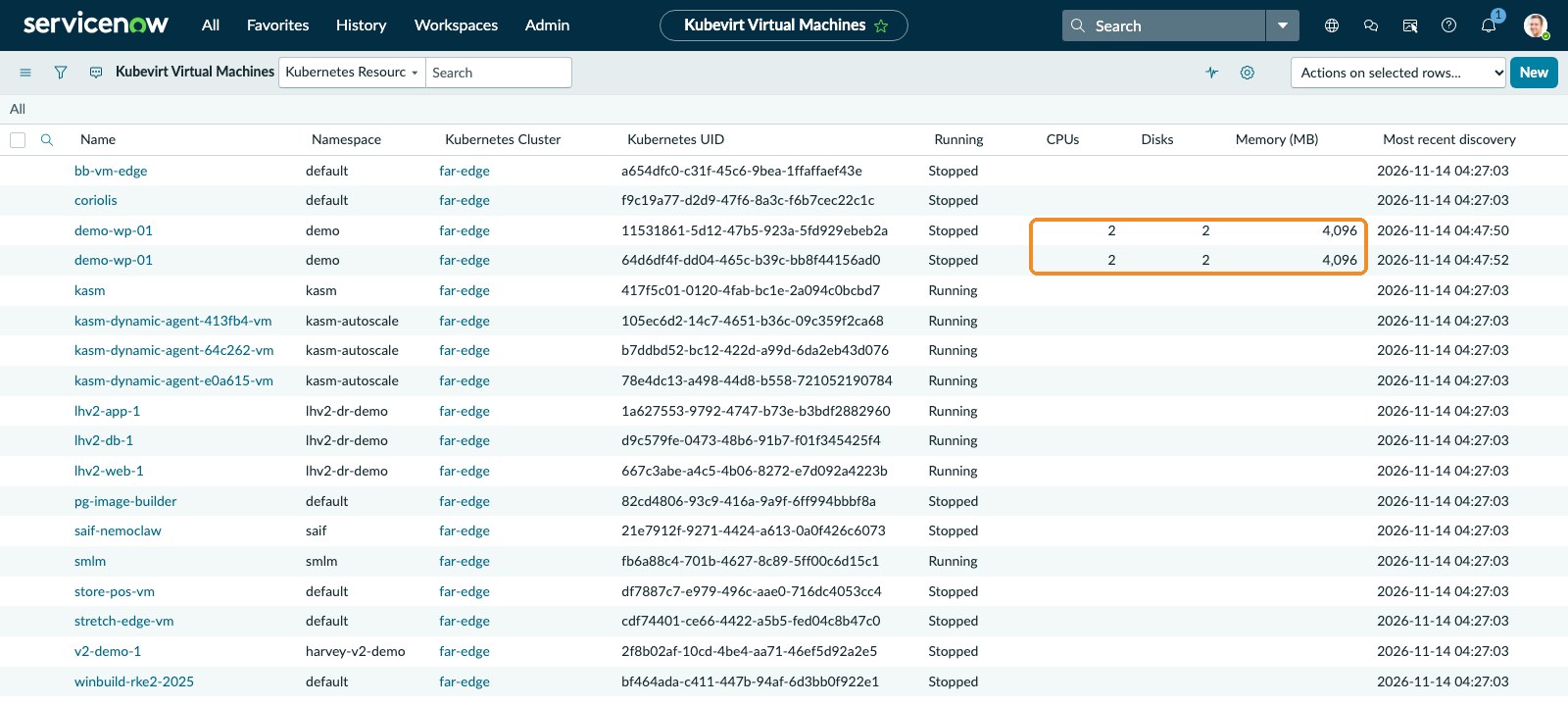
Out of the box, the KubeVirt VM list has empty CPUs, Disks and Memory columns:
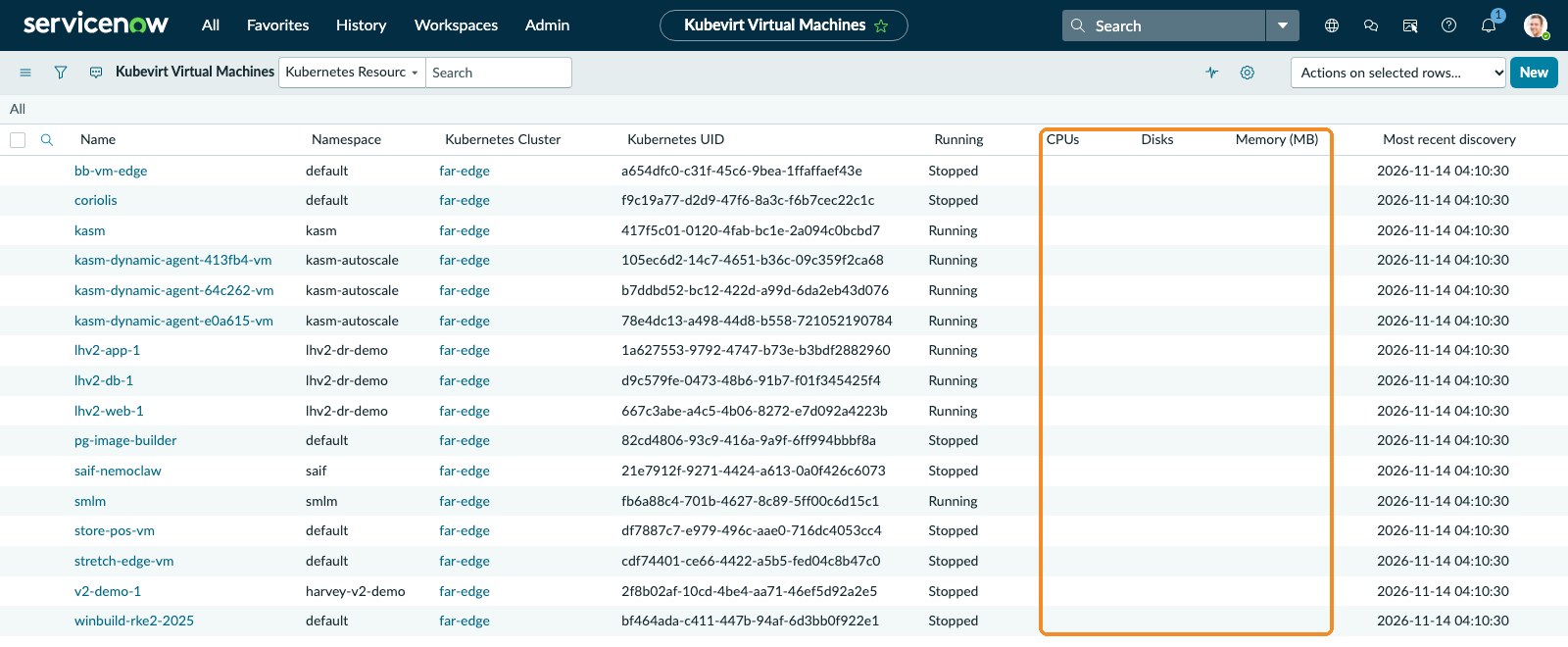
Those columns aren’t on cmdb_kubevirt_virtual_machine itself. They come through its vm_instance reference to a standard Virtual Machine Instance, and KVA creates that record only when a system property is set. KVA’s default chart mapping already sends spec.domain.cpu, memory.guest and devices.disks, so no kubevirt.mappings change is needed: KVA’s K8sInformerKubevirtHandler script multiplies cores × sockets × threads, converts 7936Mi-style memory to MB and counts the disks. Create the property, which doesn’t exist until you do:
$ curl -s -u $SN_AUTH -H 'Content-Type: application/json' "$SN/api/now/table/sys_properties" \
    -d '{"name":"sn_acc_visibility.kubevirt.create_cmdb_ci_vm_instance","value":"true","type":"boolean"}'
Optionally add sn_acc_visibility.kubevirt.create_server=true for a linked cmdb_ci_server per running VM.
New and changed VMs get sizing on their next update. Existing VMs need a full discovery: open Kubernetes Informers, select the informer and click the Full Discovery related link, or wait for the resyncMin re-list. A VM that changed after I set the property came through with 2 vCPUs, 2 disks and 4,096 MB, while VMs that hadn’t been re-sent were still blank:
Check which KubeVirt VMs have sizing:
$ curl -s -u $SN_AUTH -G "$SN/api/now/table/cmdb_kubevirt_virtual_machine" \
    --data-urlencode "sysparm_query=ORDERBYconfiguration_item.name" \
    --data-urlencode "sysparm_fields=configuration_item.name,vm_instance.cpus,vm_instance.memory,vm_instance.disks" \
    | jq -r '.result[] | [.["configuration_item.name"], .["vm_instance.cpus"], .["vm_instance.memory"], .["vm_instance.disks"]] | @tsv'
bb-vm-edge
coriolis
demo-wp-01	2	4096	2
demo-wp-01	2	4096	2
kasm
kasm-dynamic-agent-413fb4-vm
…
KVA keys the VM Instance on object_id = the KubeVirt UID, the same identifier the collector uses, so both routes reconcile into one record per VM instead of creating duplicates.
Update, 2026-11-14
My instance’s HTTP 500s made the first manual full discovery fail and marked the informer Down, so ServiceNow rescheduled the next full discovery for the following day. Only VMs that changed after I set the property have sizing so far; the rest fill in on the next successful full discovery or re-list.
Collector or KVA?
| Collector + IRE | KVA | |
|---|---|---|
| Installs in the cluster | nothing (reads through Rancher) | one informer Deployment per cluster |
| Freshness | each run (schedule it) | near real time (watches) |
| VM sizing | always | with create_cmdb_ci_vm_instance=true |
| Kubernetes objects (pods, workloads, namespaces) | no | yes |
| Running VM → hypervisor node relationship | yes | node name on the KubeVirt VMI record |
| Custom CMDB rules | one hosting rule | none |
They work well together: KVA for live, Kubernetes-native records; the collector for clusters where you can’t install an agent, and for the node relationships.
Troubleshooting
MISSING_DEPENDENCY/METADATA_RULE_MISSING: the class is dependent and the payload names no parent, or no hosting rule exists for the parent you chose. List the accepted parents fromcmdb_metadata_hosting(Step 2).MULTIPLE_DEPENDENCIES: send one hosting relationship per dependent CI.IDENTIFICATION_RULE_FOR_LOOKUP_MISSING:lookupitems such ascmdb_key_valueneed their own identification rule; use the Table API or add the rule.- “Aggregation field is not specified for aggregate type SUM”: when you create a report through the Table API, the field is
sumfield, notsum_field. - Wrong Harvester version: through the Rancher proxy,
management.cattle.iosettings belong to Rancher; readharvesterhci.io/v1beta1/settings/server-version. - KVA CPU/memory/disk columns blank: set
sn_acc_visibility.kubevirt.create_cmdb_ci_vm_instanceand run a full discovery (Step 7). - Informer logs
Failed to get ecc message. status: 500: the instance is failing, not the informer. ServiceNow marks the informer Down and postpones the full discovery; the informer recovers once the instance answers again.
Takeaways
- Harvester VMs fit ServiceNow’s standard VM model, so every report, workflow and integration that understands Virtual Machine Instances works unchanged.
- Going through Rancher keeps a collector to one token, one endpoint and read-only access, no matter how many clusters you add.
- KVA covers KubeVirt natively, and one system property turns its records into fully sized VM Instances.
- Once the VMs are in the CMDB, ServiceNow surfaces problems you didn’t know about: stopped VMs holding most of the storage, and VMs whose guest OS nobody can name.
What’s next
- Roll the KVA informer out to the other three clusters.
- Run the collector on a schedule from a lab host so the CMDB keeps up with VMs that start, stop and move.
- Check the narrated video of the ServiceNow screens in the SUSE Virtualization how-to videos.