Windows assumes it might be running on Hyper-V. When a hypervisor advertises Hyper-V’s paravirtual interfaces, called enlightenments, Windows uses them for timers, interrupts, spinlocks and inter-processor signals instead of poking at emulated hardware. Every avoided emulation is a VM exit that never happens.
KVM implements most of those interfaces, and KubeVirt exposes them, but a VM only gets them if its spec asks. Until SUSE Virtualization (Harvester) 1.9, the Windows templates didn’t. I changed that in harvester#11127, and added a template for prepared Windows images in harvester#11669.
What enlightenments bought in my tests:
- Periodic I/O stalls disappeared. Sustained Windows writes stopped pausing for 7–10 seconds every few batches.
- A write-heavy phase ran 24% faster with nothing changed but the enlightenments.
- Older Windows kept its I/O performance. Without enlightenments, Windows Server 2012 R2 and 2016 lost 61–69% of their random 4K IOPS and pinned the guest CPU at 100%.
- The optimized templates’ virtio-blk disks doubled random-write and mixed IOPS compared with virtio-scsi.
Compared with VMware: in CPU and memory benchmarks, Windows VMs on SUSE Virtualization with these settings outperformed the same workloads on VMware vSphere. I’ll publish the full results and methodology in a follow-up post.
What shipped in 1.9
The Windows templates now enable nine Hyper-V features and a Hyper-V reference clock. Here’s the block from the templates, which you can also paste into any existing Windows VM’s YAML:
spec:
  template:
    spec:
      domain:
        features:
          hyperv:
            relaxed:     { enabled: true }   # no watchdog panics when a vCPU is descheduled
            vapic:       { enabled: true }   # paravirtual APIC: fewer exits on interrupts
            spinlocks:   { enabled: true, spinlocks: 8191 }
            vpindex:     { enabled: true }   # virtual processor index, needed by synic/ipi
            synic:       { enabled: true }   # synthetic interrupt controller
            synictimer:  { enabled: true, direct: { enabled: true } }
            ipi:         { enabled: true }   # paravirtual inter-processor interrupts
            runtime:     { enabled: true }
            reset:       { enabled: true }
        clock:
          utc: {}
          timer:
            hyperv: { present: true }        # Hyper-V reference TSC page
            hpet:   { present: false }
            pit:    { tickPolicy: delay }
            rtc:    { tickPolicy: catchup }
Three features are deliberately off: frequencies, reenlightenment and
tlbflush. They can complicate live migration between hosts with different CPUs, and
my tests showed the stall fix doesn’t need them (more below).
Which template to use
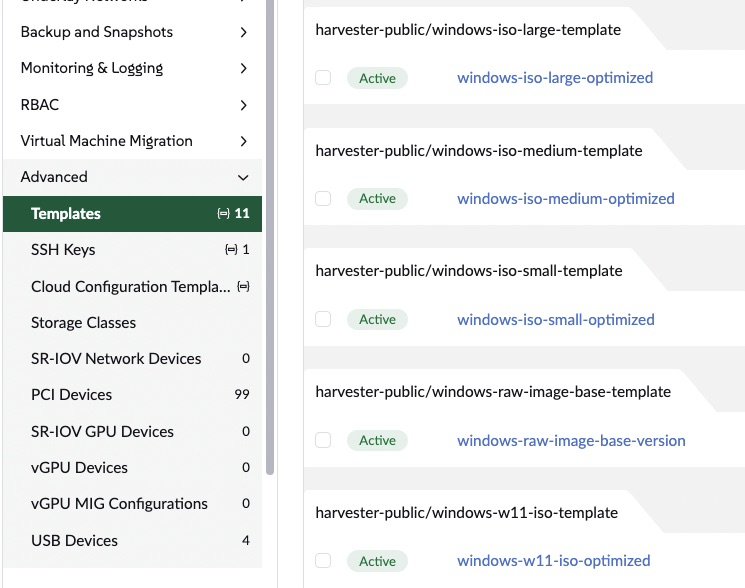
Pick one of the -optimized versions when creating a Windows VM:
| Template | vCPU | RAM | Use for |
|---|---|---|---|
windows-iso-small-optimized | 2 | 4 GiB | installing from an ISO, light workloads |
windows-iso-medium-optimized | 4 | 16 GiB | installing from an ISO, general servers |
windows-iso-large-optimized | 8 | 32 GiB | installing from an ISO, heavy workloads |
windows-w11-iso-optimized | 4 | 8 GiB | Windows 11 (UEFI, Secure Boot, vTPM) |
windows-image-optimized | 4 | 16 GiB | prepared (sysprepped) images with Cloudbase-Init; in 1.9.1 and 1.10 |
All of them carry the enlightenments above, and their root disks use virtio-blk. They also attach the virtio driver ISO during installation, because Windows needs the virtio drivers to see that disk.
Results
Stalls gone
My clearest result came from a fleet test: 10 VMs (5 Windows Server 2022, 5 Ubuntu) writing in parallel to LVM thin volumes on one Dell R640 with a hardware RAID-5. Each Windows VM wrote 500 files of 20 MiB, then compressed and expanded them. Across five rounds I changed one setting at a time: disk bus, thin-pool zeroing, then enlightenments.
Rounds 1 to 4 all showed the same pattern: most batches of 50 files took about 2 seconds, but every second or third batch stalled for 7–10 seconds. Storage tuning made the stalls shallower but never removed them. Enlightenments did. Seconds per 50-file batch on one Windows VM (six of the ten batches shown; the standard deviation covers all ten):
| Round | Files 1–50 | 101–150 | 201–250 | 301–350 | 351–400 | 451–500 | Std. dev. |
|---|---|---|---|---|---|---|---|
| 4: storage tuned, no enlightenments | 2.2 | 2.1 | 9.5 | 2.4 | 7.6 | 2.6 | 2.51 s |
| 5: plus 13 enlightenments | 1.8 | 1.9 | 1.9 | 3.7 | 3.2 | 3.3 | 0.78 s |
| 6: shipped set of 9 enlightenments | 1.01 | 0.95 | 0.91 | 1.80 | 1.39 | 1.44 | 0.28 s |
So the stalls weren’t the RAID controller flushing, as they first appeared. They came from Windows servicing paravirtual interrupts and timers poorly, which made it dispatch I/O in bursts. Round 6 also confirmed that the trimmed, migration-safe set of features is enough. (Round 6 was a follow-up run of the write phase alone, so compare its consistency rather than its absolute times.)
Enlightenments alone, from round 4 to round 5:
- Write phase: 35.9 s → 27.1 s per VM on average (−24%).
- Whole Windows workload: 435 s → 416 s (−4%). Compression is CPU-bound and barely moved.
With all tuning combined (disk bus, pool zeroing and enlightenments), the Windows workload went from 493 s to 416 s (−16%) and its write phase from 48.6 s to 27.1 s (−44%).
Older Windows needs them most
I repeated an on/off comparison on Windows Server 2012 R2 and 2016 with diskspd and
7-Zip. Without enlightenments:
- Random 4K IOPS dropped by 61–69%.
- Guest CPU sat at 100% during I/O tests.
- 7-Zip, a pure CPU benchmark, didn’t change.
That pattern is the signature of VM exits: pure computation runs natively either way, but every interrupt, timer and inter-processor signal pays an emulation cost without enlightenments. I/O generates a lot of those.
virtio-blk beats virtio-scsi for Windows writes
With enlightenments on, I compared the two paravirtual disk buses on identical Windows
Server 2022 VMs (4 vCPU, 16 GiB) on LVM thin storage, using diskspd with a 50 GiB
preallocated file:
| Workload | virtio-scsi | virtio-blk | Change |
|---|---|---|---|
| Sequential read, 1 MiB, QD32 | 4,663 MiB/s | 4,907 MiB/s | +5% |
| Sequential write, 1 MiB, QD32 | 1,370 MiB/s | 1,307 MiB/s | −5% |
| Random read, 4 KiB, QD32×4 | 151,078 IOPS | 144,714 IOPS | −4% |
| Random write, 4 KiB, QD32×4 | 6,375 IOPS | 13,264 IOPS | +108% |
| Random 70/30, 4 KiB, QD32×4 | 12,413 IOPS | 25,770 IOPS | +108% |
Reads tie, but virtio-blk doubles random-write and mixed IOPS and halves their average
latency (mixed: 10.3 ms → 5.0 ms, p99 48 ms → 17 ms). That’s why the -optimized
templates default to virtio-blk. Choose virtio-scsi only when you need SCSI features,
such as many disks behind one controller or persistent reservations for clustering.
Applying it to existing VMs
- Stop the VM.
- Edit its YAML and add the
features.hypervandclockblocks shown above. - Start it again. Windows detects the enlightenments at boot; no driver changes are needed.
Changing the disk bus of an existing Windows VM is riskier: Windows must already have the virtio-blk driver installed, or it won’t boot. Install the driver first (the SUSE VMDP package includes it), then switch the bus.
What’s next
- Enlightenment toggles in the UI. Today the settings come from templates or YAML. SUSE Virtualization 1.10 adds generic access to KubeVirt features in the VM builder, which lays the groundwork.
- The VMware comparison. CPU and memory results, with the methodology, are coming in a follow-up post.