TL;DR
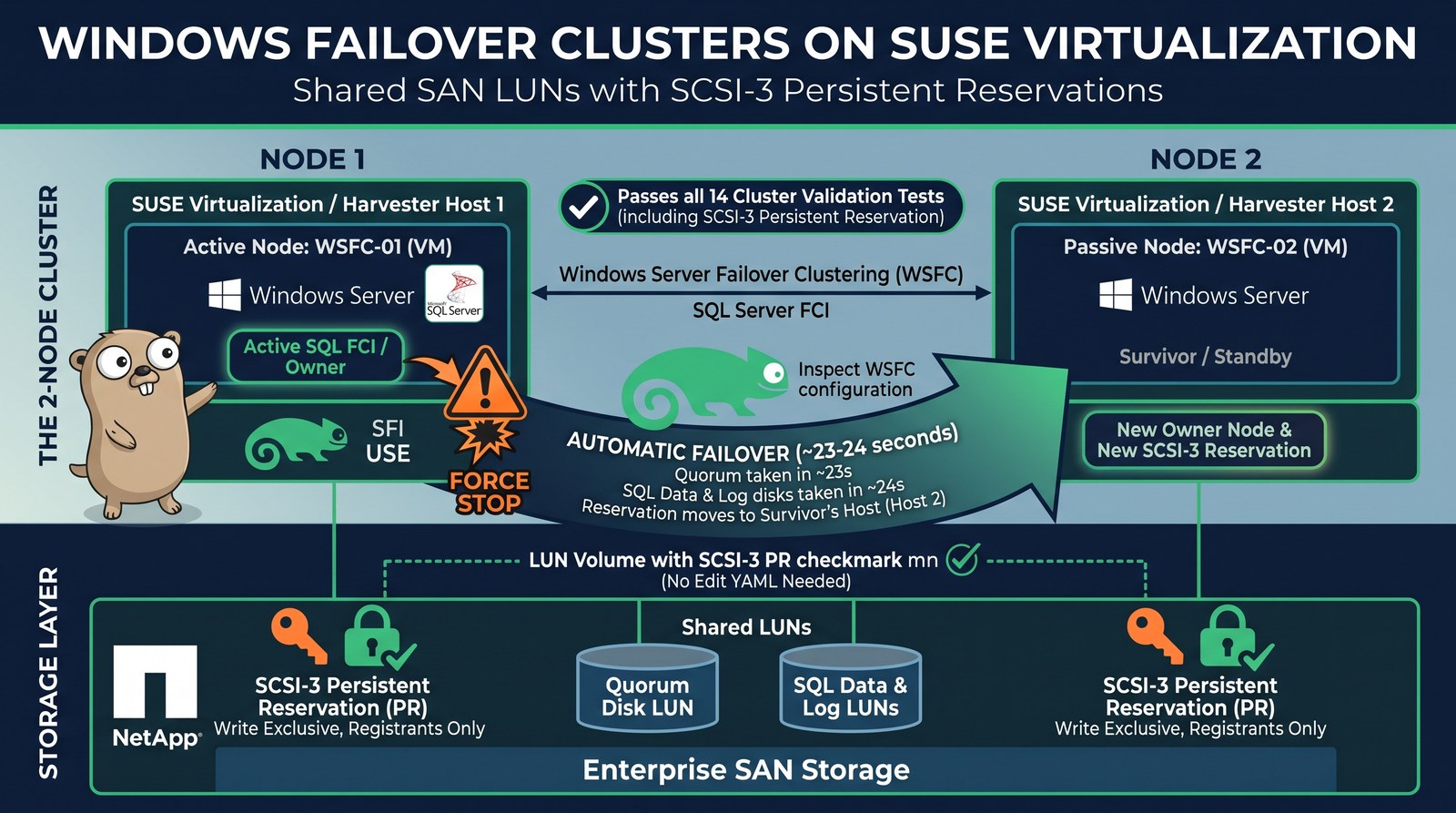
- Windows Server Failover Clustering (WSFC) and SQL Server Failover Cluster Instances (FCI) run on SUSE Virtualization (Harvester) with shared SAN LUNs and SCSI-3 Persistent Reservations (PR) passed through to the guests.
- With the pending UI change, you add the shared disk as a LUN volume and tick SCSI-3 Persistent Reservation. No more Edit YAML.
- A 2-node cluster passes all 14 storage validation tests, including Validate SCSI-3 Persistent Reservation. On the array, a real “write exclusive, registrants only” reservation is held by the owner’s host.
- Hard kill of the owner VM (
kill -9of its QEMU process): the survivor owns every cluster disk after ~27 s, which is 20 s of Windows heartbeat timeout plus a 6 s arbitration wait, and the reservation moves to the survivor’s host. A Harvester Force Stop fails over in ~10 s. - Merged: the pr-helper image fix, the
/etc/multipathpermission fix and the KubeVirt 1.9 bump. Still pending: the setting that enables PR, the UI, the docs, and a VMDP release with the fixed Windows SCSI driver.
“Can I run a Windows failover cluster on it?” comes up in almost every conversation about moving off VMware. On SUSE Virtualization the answer used to be “only with hand-edited YAML, three node tweaks and a driver workaround”. This post shows the answer once the work tracked in harvester/harvester#11834 lands: SQL Server FCI on shared SAN LUNs, configured from the UI, with fencing that the storage array enforces.
Setup
| Piece | Version / detail |
|---|---|
| Hypervisor | SUSE Virtualization (Harvester) v1.9.0, 3-node cluster, the two cluster VMs pinned to different hosts |
| KubeVirt | 1.8.4 with the PersistentReservation feature gate and the fixed pr-helper image (see Status) |
| Storage | NetApp ONTAP iSCSI LUNs via Trident ontap-san, ReadWriteMany + volumeMode: Block, dm-multipath on the hosts |
| Guests | Windows Server 2022, SUSE VMDP drivers with the fixed pvvxscsi virtio-scsi driver (test build 1.0.1.18) |
| Database | SQL Server 2022 Developer Edition, FCI with data on S: and log on L: (both shared LUNs) |
| UI | harvester-ui-extension#1182, in review, run from a development build against the cluster |
Three shared LUNs: a 1 GiB disk witness (Quorum), 4 GiB SQLData and 2 GiB SQLLog.
Two hosts, not one
PR registrations belong to a host initiator (the iSCSI I_T nexus). Two cluster VMs on the same host share one initiator, so the array can’t fence one from the other. Pin each cluster VM to a different host.
How the request travels
A reservation from Windows has to reach the array unchanged:
Windows (WSFC)
  -> virtio-scsi "lun" disk (reservation: true)      KubeVirt
  -> QEMU scsi-block -> qemu-pr-helper (in virt-handler)
  -> dm-multipath (libmpathpersist, reservation_key file)
  -> iSCSI -> ONTAP LUN, which enforces the reservation
Each hop needed a fix or a setting, which is why this took an epic rather than a single PR.
Step 1: Add the shared LUN in the UI
Keep the boot disk on VirtIO (virtio-blk). Then, for each shared volume, use Volumes → Add Existing Volume, pick the shared RWX Block volume and set Type to lun. From there, the form:
- forces Bus to SCSI and marks the disk shareable;
- shows the SCSI-3 Persistent Reservation checkbox;
- defaults I/O Error Policy to report;
- offers
lunonly for volumes that can be shared: RWX Block from a non-Longhorn storage class.
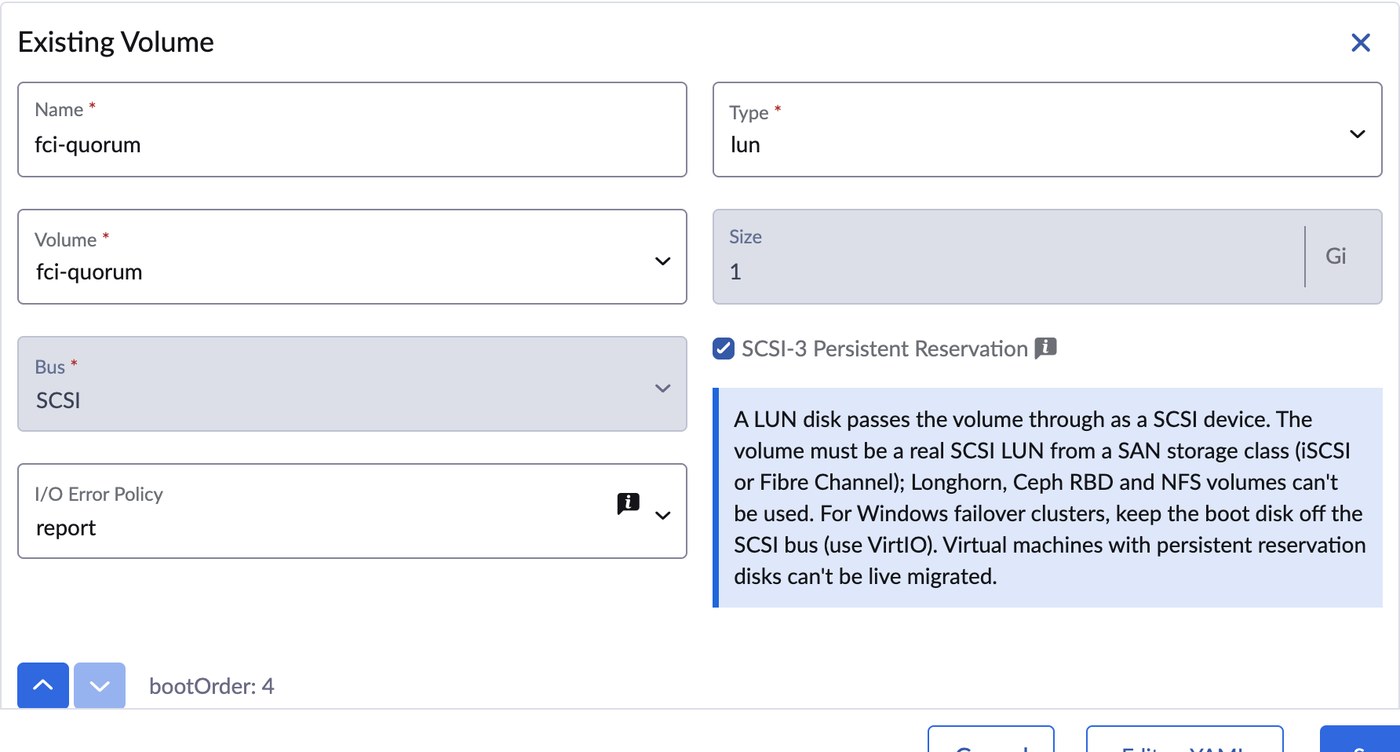
That form writes the same spec I used to type by hand:
domain:
  devices:
    disks:
      - name: rootdisk
        bootOrder: 1
        disk: {bus: virtio}
      - name: fci-quorum
        shareable: true
        errorPolicy: report
        lun: {bus: scsi, reservation: true}
      # fci-data and fci-log look the same
volumes:
  - name: fci-quorum
    persistentVolumeClaim: {claimName: fci-quorum}   # ontap-san, RWX, volumeMode: Block
On a release with the new persistent-reservation-enabled setting, the checkbox stays disabled until an administrator turns the setting on, and the form links straight to Settings:
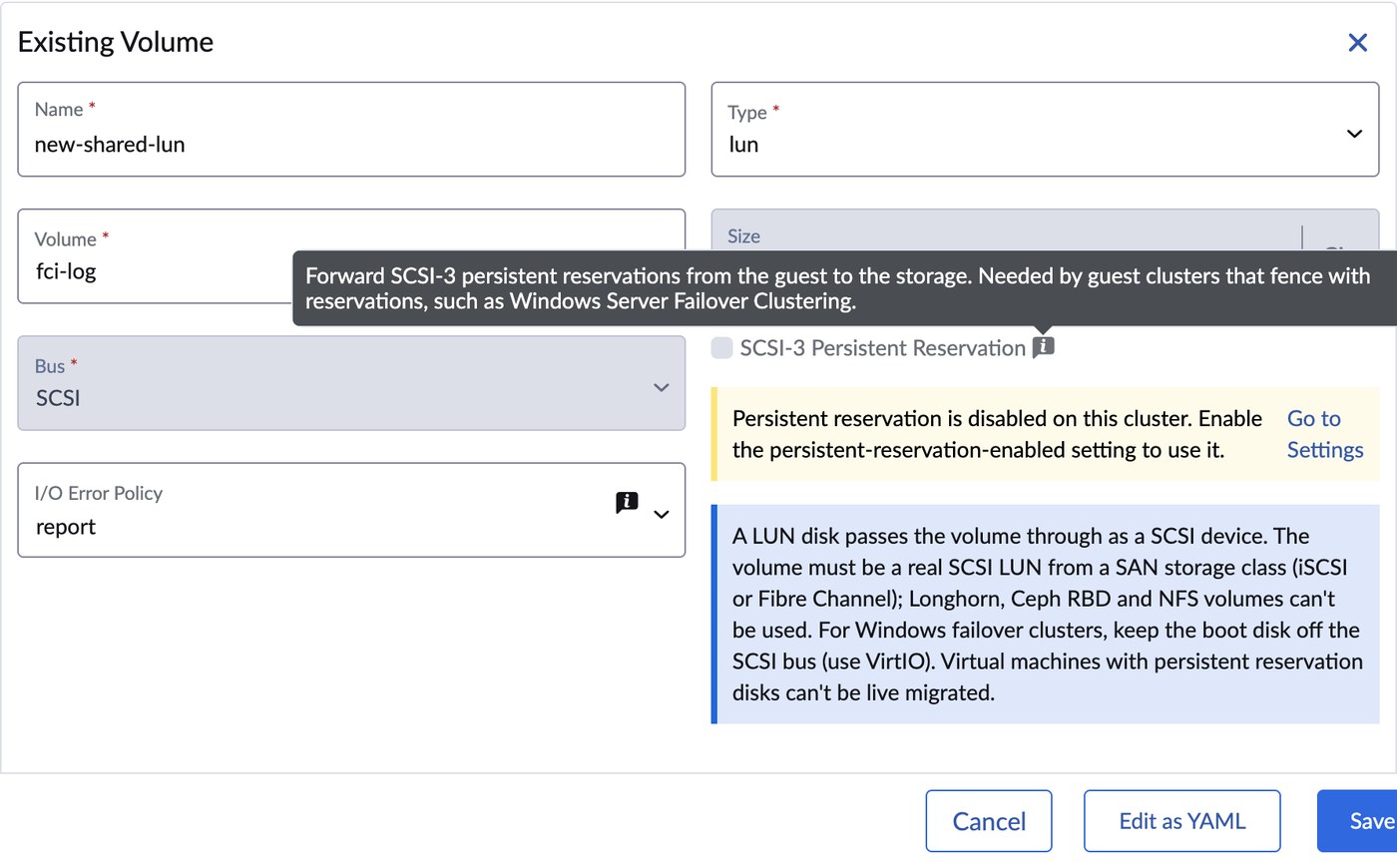
Keep the default stop policy off shared LUNs
On a shared LUN, a write that fails with RESERVATION CONFLICT is the expected result of fencing. With KubeVirt’s default
errorPolicy: stop, that error pauses the whole VM.reporthands the error to Windows, which is what WSFC expects. The UI setsreportfor you.
Step 2: Validate the cluster
With both nodes joined to the domain and the Failover Clustering feature installed, I created the cluster with the Quorum disk as witness and ran the storage validation against all three LUNs:
$tests = (Test-Cluster -List | Where-Object Category -eq 'Storage').DisplayName
Test-Cluster -Cluster sqlclu -Disk (Get-ClusterResource SQLData, SQLLog, Quorum) `
  -Include $tests -ReportName C:\wsfc\validate-2node
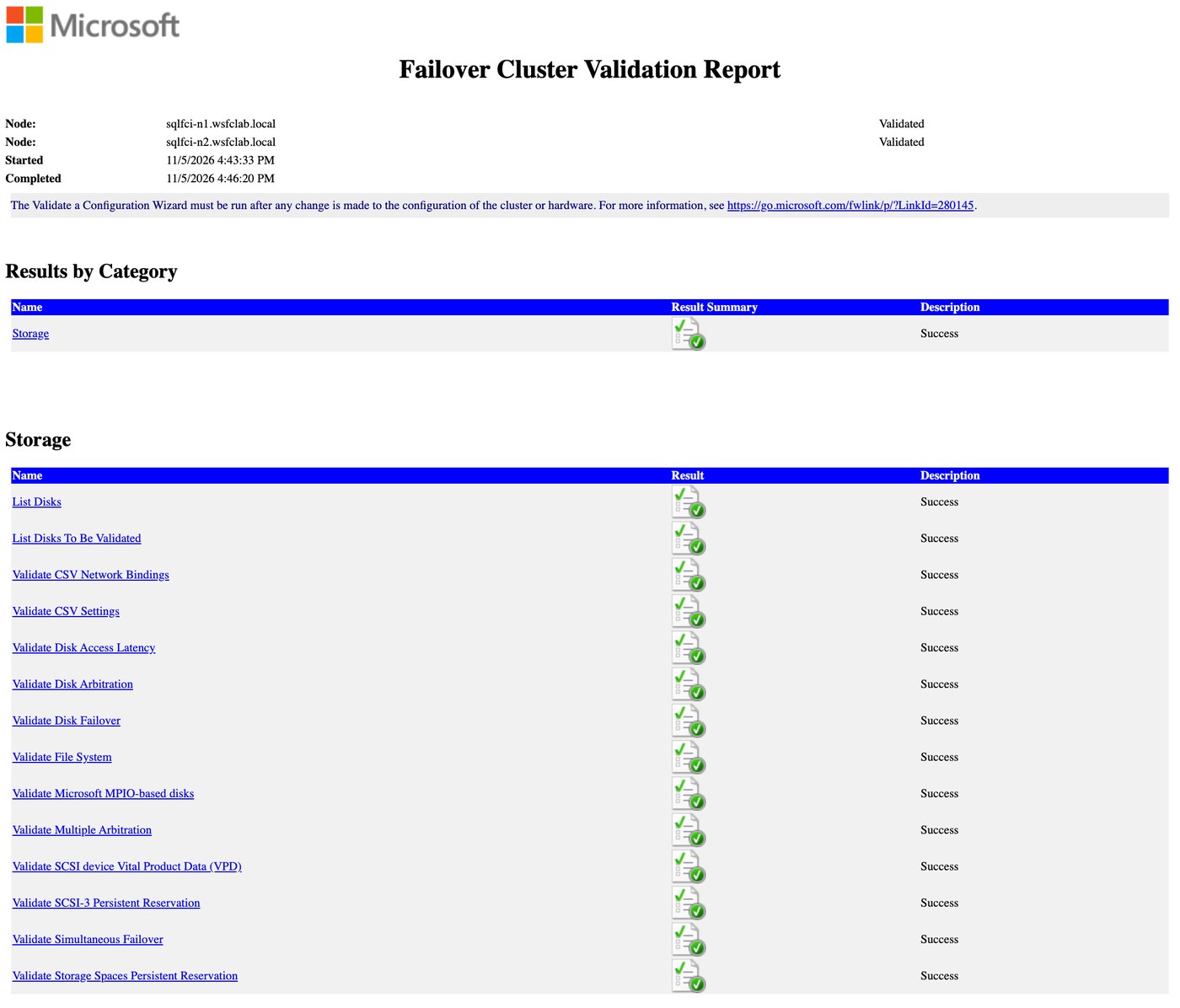
All 14 pass. Here is the persistent reservation part of the report:
Validate SCSI-3 Persistent Reservation
  Test Disk 0 supports Persistent Reservation.
  Test Disk 1 supports Persistent Reservation.
  Test Disk 2 supports Persistent Reservation.
Windows isn’t the only witness. ONTAP shows the reservation on the quorum LUN, held by the initiator of the host that runs the owner node:
admin::*> lun persistent-reservation show -vserver svm0 -path /vol/<quorum-volume>/lun0
Key                     Protocol Type                             Initiator Name
----------------------- -------- -------------------------------- --------------------------
92:5f:9a:d2:00:01:73:4d iscsi    write exclusive registrants only iqn.1996-04.de.suse:01:<host-b>
Step 3: Install SQL Server FCI
SQL Server setup takes the clustered disks by name:
/ACTION=InstallFailoverCluster /FEATURES=SQLENGINE /FAILOVERCLUSTERNETWORKNAME=SQLFCI
/FAILOVERCLUSTERDISKS="SQLData" "SQLLog" /FAILOVERCLUSTERIPADDRESSES="IPv4;<fci-ip>;Cluster Network 1;255.255.255.0"
/SQLUSERDBDIR=S:\MSSQL\Data /SQLUSERDBLOGDIR=L:\MSSQL\Log ...
Final result: Passed. A client on the domain controller connects through the FCI name and writes to a database whose files sit on the shared LUNs:
server_name  : SQLFCI
active_node  : SQLFCI-N2
is_clustered : 1
edition      : Developer Edition (64-bit)

db       physical_name
--       -------------
wsfcdemo S:\MSSQL\Data\wsfcdemo.mdf
wsfcdemo L:\MSSQL\Log\wsfcdemo_log.ldf
Open the SQL ports yourself
SQL Server setup doesn’t add Windows Firewall rules. Allow TCP 1433 (and UDP 1434 for the Browser) on every node, or clients only work against the node they’re logged into.
Step 4: Pull the plug
I made one node own every cluster disk, then killed its QEMU process with SIGKILL on the host: no shutdown, no warning, the closest thing to a host losing power. Timeline from the survivor’s cluster log (UTC):
18:43:25.6  kill -9 of the owner VM's QEMU process
18:43:33.2  NetFT: missed more than 40 percent of consecutive heartbeats
18:43:45.8  View change: downers=(node 2)                       (+20.2 s)
18:43:46.1  Quorum: HardDiskpPRArbitrate: Slow Path, Sleeping for 6 secs
18:43:52.1  Quorum: Successful reserve
18:43:52.2  Quorum Online                                       (+26.6 s)
18:43:53.0  SQLData and SQLLog Online                           (+27.4 s)
On the array, the reservation moved to the survivor’s host:
Key                     Protocol Type                             Initiator Name
----------------------- -------- -------------------------------- --------------------------
b9:75:3a:7f:00:02:73:4d iscsi    write exclusive registrants only iqn.2016-04.com.open-iscsi:<host-a>
That’s fencing doing its job: the dead node’s registration lost the reservation, and the array now blocks writes from anyone who isn’t registered. Harvester restarted the killed VM and it rejoined the cluster.
Where the seconds go
Of the ~27 s, almost all is Windows doing what it’s designed to do:
| Phase | Time | What decides it |
|---|---|---|
| Declare the node down | 20.2 s | SameSubnetThreshold × SameSubnetDelay. Microsoft documents 10 × 1 s; this Windows Server 2022 cluster reports a threshold of 20 out of the box |
| Wait before taking the disk from a dead owner | 6.0 s | WSFC’s slow-path arbitration: the challenger waits for the old owner to defend its reservation before it preempts |
| Reserve, bring the quorum, data and log disks online | ~1.2 s | qemu-pr-helper, multipath and the array: milliseconds per PR command |
Then SQL Server starts and replays its log. Don’t lower the heartbeat threshold to chase the number: Microsoft’s tuning guidance is to relax it, so that a busy network doesn’t trigger failovers.
A Harvester Force Stop is gentler than a kill: Windows gets a shutdown signal first and the cluster service reports a graceful shutdown, so the survivor skips both waits. In that test, the quorum disk was online on the survivor 9.6 s after the click.
For SQL Server role failover between the two nodes, I measured ~21 s for a planned move and ~36 s after a Force Stop, with no lost committed rows. That run used the earlier driver workaround (see below) and is recorded in the epic.
Status: merged and pending
| Item | What it fixes | Status |
|---|---|---|
| #11844 | Ships a pr-helper image that matches virt-handler and contains /entrypoint.sh; without it the gate crash-loops virt-handler (#10701) | ✅ Merged 2026-10-08 |
| #11837 | Creates /etc/multipath with mode 0755 so the capability-dropped qemu-pr-helper can read prkeys; with 0644, RESERVE silently never reaches the array (#11836) | ✅ Merged 2026-10-13 |
| #12039 | KubeVirt 1.9 (pr-helper images for amd64 and arm64) | ✅ Merged 2026-10-23 |
| #12059 | persistent-reservation-enabled setting, default off, that survives upgrades (#11840) | 🔄 In review |
| ui-extension#1182 | LUN disk type, PR checkbox, error policy (#11841) | 🔄 In review |
| docs#1149 | Guest clustering guide: multipath config, boot bus, Windows steps, maintenance mode (#11843) | 🔄 In review |
VMDP pvvxscsi (bsc#1284387, #11838) | Reports bus type SAS instead of parallel SCSI, and passes RESERVATION CONFLICT back to Windows | ⏳ Fixed in VMDP, waiting on a release; the latest public image (vmdp:2.5.5.7.1) still ships 1.0.1.14 |
| #11835 | A RerunOnFailure VM can refuse to start after virtctl stop --force | 🔄 Open |
| Guardrails | Reject or warn about lun disks on volumes that can’t present a SCSI device (Longhorn, Ceph RBD, NFS) | 💭 Under consideration |
Recording this post also caught three bugs in my own UI PR: saving a VM with lun volumes failed validation, the error-policy select was pushed out of view, and the info banner showed an HTML entity. Fixes are ready for the PR, and the screenshots above come from the fixed build.
Until the VMDP release
Windows with the current public VMDP rejects the shared LUNs (“Disk bus type does not support clustering”) and fails the PR validation, because its driver reports a successful RESERVE when the array said RESERVATION CONFLICT. Until the release, either:
- set the bus type by hand (
HKLM\SYSTEM\CurrentControlSet\Services\pvvxscsi\Parameters,BusType=0xA, then reboot) and use the upstream virtio-winvioscsidriver for the shared LUNs, or - use the VMDP test build from the bug if SUSE support provides it to you.
Things that bite
- Boot disk on the SCSI bus. KubeVirt gives a VM one virtio-scsi controller. If the boot disk sits on it too, WSFC reports every shared LUN as “on the system bus” and never sends a PR command. Install with the boot disk on VirtIO, or move it: delete
HKLM\SYSTEM\CurrentControlSet\Services\pvvxblk\StartOverride, then immediately shut down and switch the bus. Windows recreates the key on the next reboot, and a SCSI → VirtIO switch with it present ends inINACCESSIBLE_BOOT_DEVICE. - Host multipath. dm-multipath needs
reservation_key filefor PR, andskip_kpartx yesso the host doesn’t map the guest’s NTFS partitions on shared LUNs. Scope both to the SAN vendor’s devices; the docs PR has the full snippet. - Duplicate iSCSI initiator names. Clusters installed before v1.5 can carry the same IQN on every node (#11842). Your array then sees one initiator, and fencing is meaningless. Check
/etc/iscsi/initiatorname.iscsion every node; both the issue and the docs PR have the fix. - No live migration. KubeVirt marks VMs with PR disks as not live-migratable. Plan host maintenance as a guest-cluster failover plus a shutdown. Harvester’s
harvesterhci.io/maintain-mode-strategylabel covers this. - Storage that can’t do it. Longhorn, Ceph RBD and NFS can’t back these disks: a
lundisk needs a real SCSI LUN on the host, and WSFC needs SCSI-3 PR from the array. Use a SAN CSI driver (iSCSI or Fibre Channel), such as Tridentontap-san.
Takeaways
- Harvester now forwards SCSI-3 reservations from Windows guests all the way to the SAN, and the array enforces them. That’s the foundation WSFC and SQL Server FCI need.
- Once the setting, the UI and the VMDP release ship, this becomes a checkbox and a driver install instead of YAML and registry edits.
- A similar shared-LUN pattern without reservations runs Oracle RAC, so both big “shared disk” clustering stacks have a path on SUSE Virtualization.
Thanks
Thanks to Ivan Sim and Tim Serong for reviewing and merging the multipath fix, to Vicente Cheng and Kiefer Chang for the pr-helper image fix, to Gaurav Mehta and Vicente Cheng for the review questions on the setting PR, and to the SUSE VMDP team for turning the driver fix around quickly.